Governance Proposal Submission Guide
TL;DR: Run
zigchaind tx gov draft-proposalto build proposal files. Link metadata, set the governance module authority when needed, and submit your governance proposal withzigchaind tx gov submit-proposal.
Overview
A governance proposal lets staked ZIG holders shape ZIGChain protocol decisions through on-chain votes. This guide walks through draft, configure, and submit steps from first command to confirmed proposal ID.
New to voting rules or expedited proposals? Read ZIGChain Governance first, then return here when you are ready to submit.
You need a funded account, RPC access, and zigchaind installed locally. Test on testnet first when you are unsure about message types or parameter values.
Key Concepts
- Draft proposal: Interactive CLI flow (
zigchaind tx gov draft-proposal) that producesdraft_proposal.json(executable messages) anddraft_metadata.json(title, summary, description). - Metadata field: JSON-encoded string in
draft_proposal.json(max 255 characters) pointing to inline JSON, base64-encoded content, or an IPFS URI. - Authority field: Address that must match the governance module account for parameter-change and similar message types; default is
zig10d07y265gmmuvt4z0w9aw880jnsr700jmgkh5m. - Expedited proposal: Governance proposal with
"expedited": trueindraft_proposal.json; see ZIGChain Governance for voting rules.
Draft Your Governance Proposal
The draft step turns your idea into two JSON files the chain can read. Work through the prompts in order, then inspect both outputs before you edit metadata or authority fields in the next section.
Run the Draft Command
Open a terminal where zigchaind is installed and your key is available. The draft command starts an interactive wizard that walks you through proposal type, message selection, and metadata fields.
Use the following command to start the proposal draft process:
zigchaind tx gov draft-proposal
The wizard runs in your current directory and writes files there when you finish the prompts. Keep that path in mind so you can open draft_proposal.json and draft_metadata.json in the steps below.
Select Proposal Type
The first prompt asks which proposal category fits your change. The interface displays common options such as:
? Select proposal type:
  ▸ text
    community-pool-spend
    software-upgrade
    cancel-software-upgrade
    other
Output example:
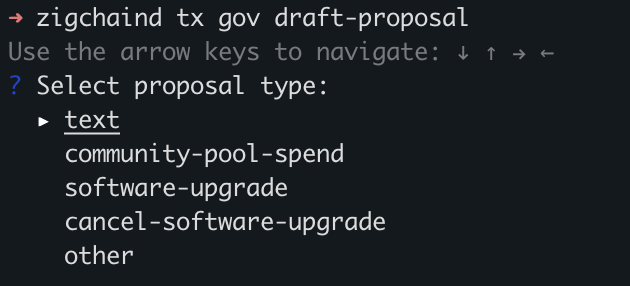
If the type of proposal you need is not listed (for example, if you are modifying module parameters), select other. This opens a second menu with every message type the governance module accepts, including parameter updates for individual modules.
? Select proposal message type:
  ▸ /cosmos.auth.v1beta1.MsgUpdateParams
    /cosmos.bank.v1beta1.MsgSend
    /cosmos.distribution.v1beta1.MsgSetWithdrawAddress
Output example:
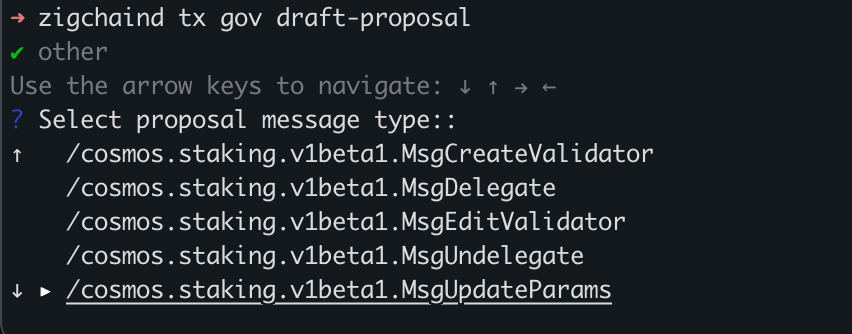
Tip: Use the arrow keys to navigate and Enter to select. After you confirm the message type, the wizard asks for proposal-specific fields before it moves on to metadata.
Provide Metadata
Metadata is what voters see in explorers and wallets. Fill in each field carefully because you will copy or encode this content into draft_proposal.json later.
You'll be asked to fill in the required fields, such as:
- Title
- Summary
- Description
- Other fields (As requested by the interface.)
Output example:

Write a clear title and a short summary voters can scan quickly. Save the longer rationale for the description field so your governance proposal reads well in block explorers.
Review the Generated Files
When the wizard finishes, check both files before you move to metadata linking:
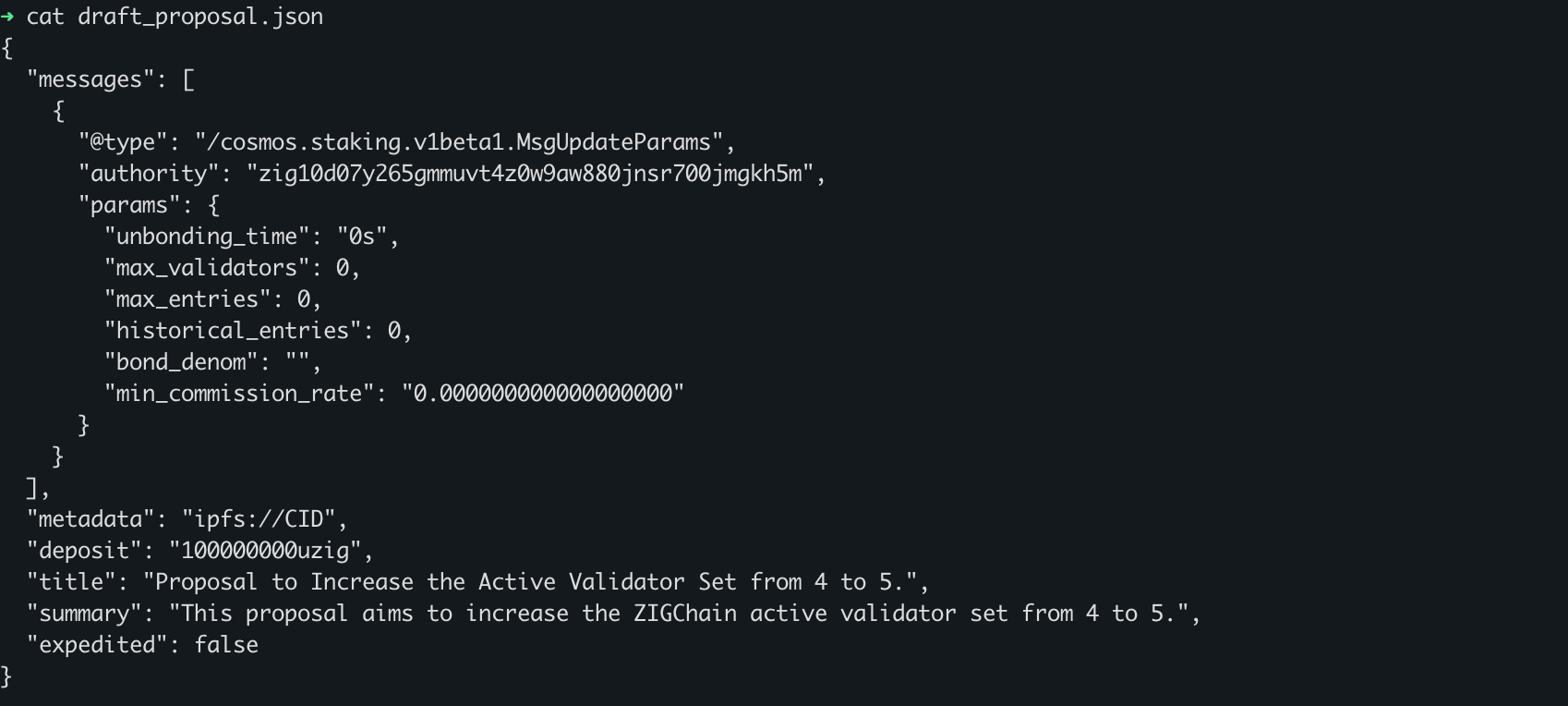
draft_proposal.json: Contains the actual message(s) to be executed if the proposal passes.draft_metadata.json: Contains a human-readable summary including title, description, and summary.
Output examples:
draft_proposal.json
draft_metadata.json
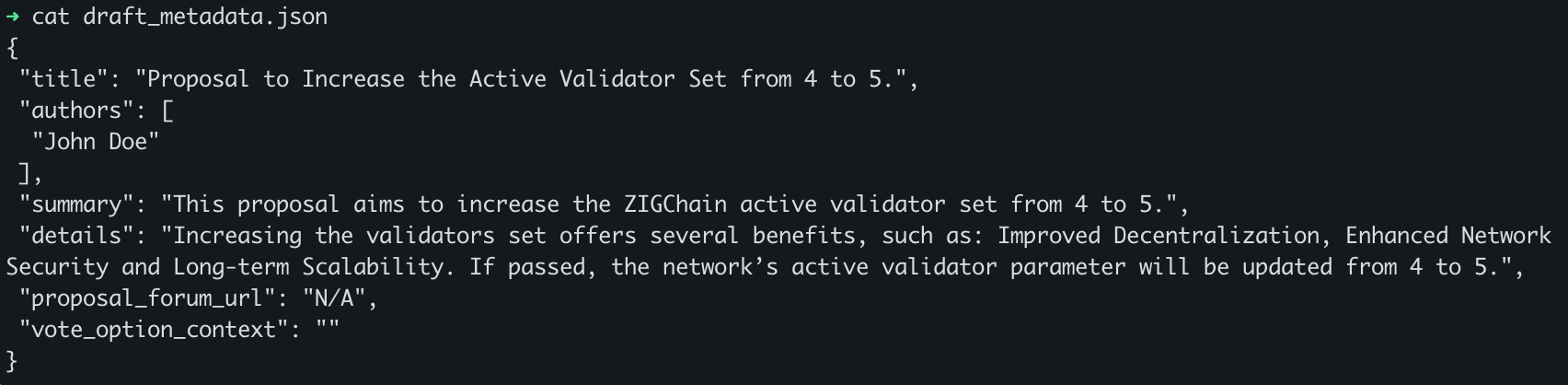
Open each file in your editor and confirm the message type and field values look correct. If something is wrong, rerun zigchaind tx gov draft-proposal rather than patching fields you do not understand.
Link Metadata and Set Authority
The CLI does not wire metadata into draft_proposal.json automatically. See Key Concepts for field limits and the default authority address.
This section covers manual edits you make after the draft wizard completes. Finish these steps before you query live parameters or submit the transaction.
Update Metadata Field
Voters and explorers read the metadata field on chain, not the standalone draft_metadata.json file. Set the metadata field manually using one of these approaches:
- Inline raw metadata – insert the contents of
draft_metadata.jsondirectly into themetadatafield. - Base64-encoded string – encode the file contents in base64 and paste the result into the field.
- IPFS reference – upload the metadata file to IPFS and set the
metadatafield to the IPFS URI.
The metadata field must be a JSON-encoded string and is limited to 255 characters.
If your inline JSON exceeds the limit, switch to base64 or IPFS so the full description remains available off chain. Reopen draft_proposal.json after editing and confirm the string is valid JSON before you submit.
Configure Authority Field When Required
Parameter-change messages must name the governance module account as authority. Without the correct address, submission fails with a signer error covered in the submit section.
Certain proposal types, especially those altering module parameters, require an authority field matching the governance module account:
zig10d07y265gmmuvt4z0w9aw880jnsr700jmgkh5m
Add this value to each message in draft_proposal.json that updates module params. Double-check the address character by character if you see the expected gov account signer error after submit.
Updating Module Parameters
Parameter proposals replace the full on-chain param set at execution time. Query live values first, then edit only the fields you intend to change.
When proposing parameter changes, you must prepare the draft_proposal.json carefully.
Always include the full set of current parameters. Only change the values you intend to update, and leave all others exactly as they are. If you omit or leave parameters empty, they may be overwritten with empty values when the proposal is executed.
1. Check Current Parameters
Run a module query against the network where you plan to submit. Use the tab that matches your target environment so flags and endpoints stay consistent.
Example:
- Mainnet
- Testnet
- Local
zigchaind query staking params \
--chain-id zigchain-1 --node https://public-zigchain-rpc.numia.xyz
zigchaind query staking params \
--chain-id zig-test-2 --node https://public-zigchain-testnet-rpc.numia.xyz
zigchaind query staking params \
--chain-id zigchain-1 --node http://localhost:26657
Output example:
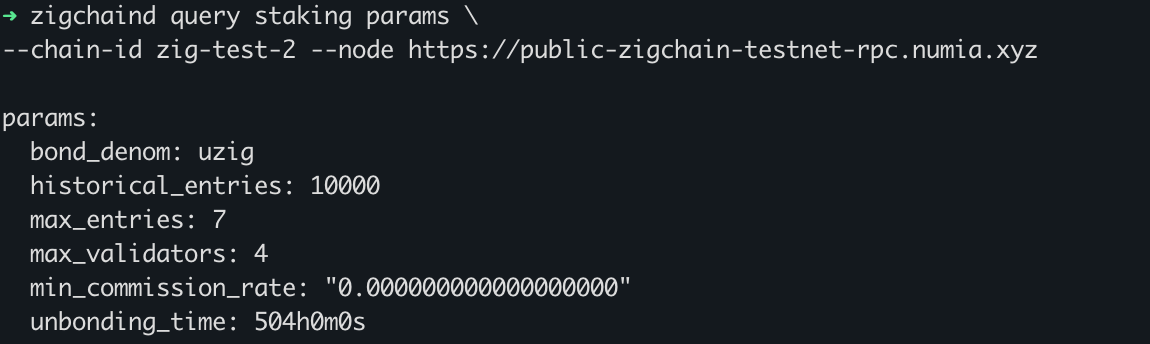
Copy the full JSON from the query response. You will paste it into draft_proposal.json in the next step and change only the values your governance proposal targets.
2. Update the Proposal File
Open draft_proposal.json in the same directory where you ran the draft command. Paste the full parameter set from the query output, then modify only the values you want to change. Keep every other parameter identical to the query response so execution does not zero out fields you meant to preserve.
vim draft_proposal.json
Output example:
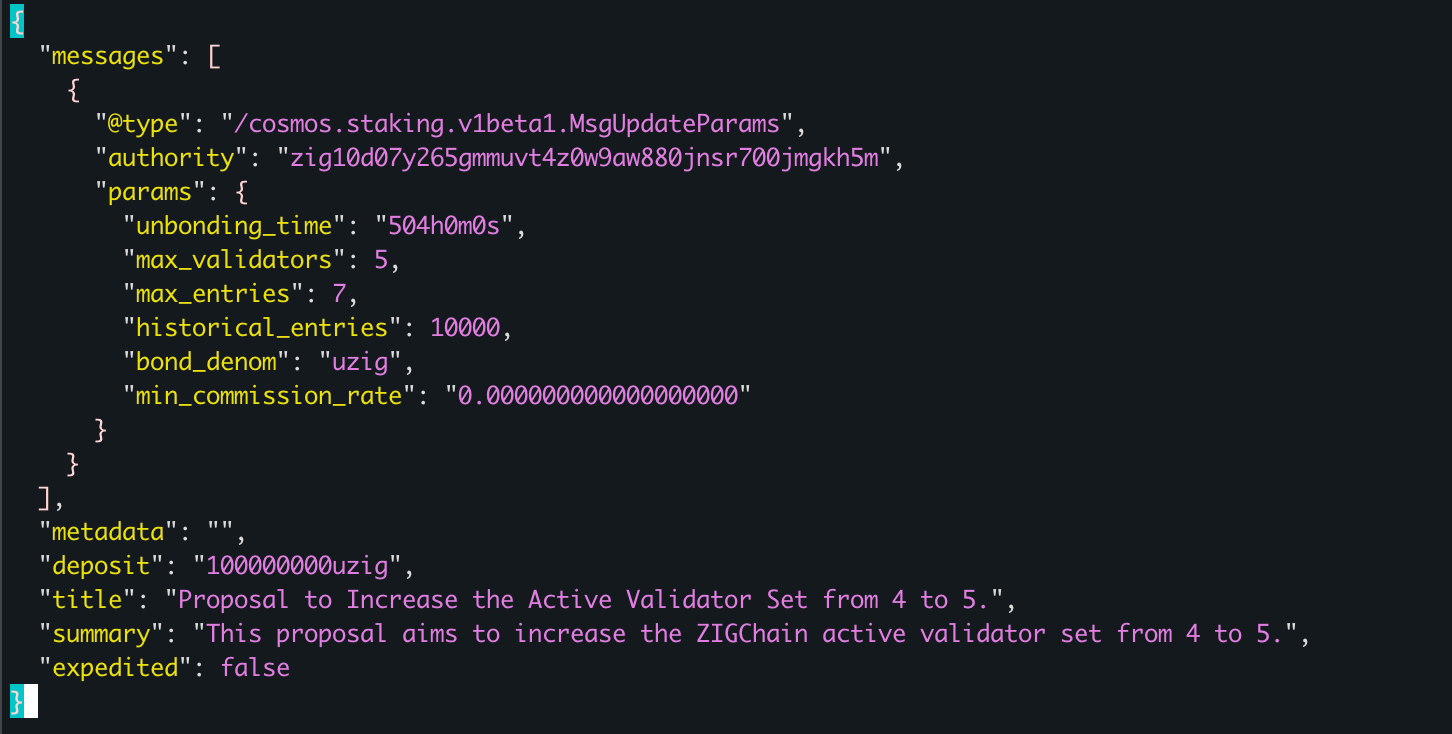
Save the file and review the diff one more time before submit. A single omitted field can change chain behavior in ways voters may not expect.
Expedited Proposals
ZIGChain supports expedited proposals with a shorter voting period and a stricter pass threshold than standard proposals. Enable it only when your change is urgent. See ZIGChain Governance for current voting rules.
To mark a proposal as expedited, set the expedited field to true:
jq '.expedited = true' draft_proposal.json > tmp.json && mv tmp.json draft_proposal.json
The jq command updates draft_proposal.json in place via a temporary file. For more details, see the Governance documentation.
Submit Your Governance Proposal
Submission broadcasts your signed draft_proposal.json to the network. Confirm metadata, authority, and parameter values first, then run the command for the environment where you want the vote to start.
Once your governance proposal is ready, use the following command to submit it:
- Mainnet
- Testnet
- Local
zigchaind tx gov submit-proposal draft_proposal.json \
  --from $ACCOUNT \
  --chain-id zigchain-1 \
  --node https://public-zigchain-rpc.numia.xyz \
  --gas-prices 2500000000azig \
  --gas auto \
  --gas-adjustment 1.3
zigchaind tx gov submit-proposal draft_proposal.json \
  --from $ACCOUNT \
  --chain-id zig-test-2 \
  --node https://public-zigchain-testnet-rpc.numia.xyz \
  --gas-prices 2500000000azig \
  --gas auto \
  --gas-adjustment 1.3
zigchaind tx gov submit-proposal draft_proposal.json \
  --from zuser1 \
  --chain-id zigchain-1 \
  --node http://localhost:26657 \
  --gas-prices 2500000000azig \
  --gas auto \
  --gas-adjustment 1.3
Output example:
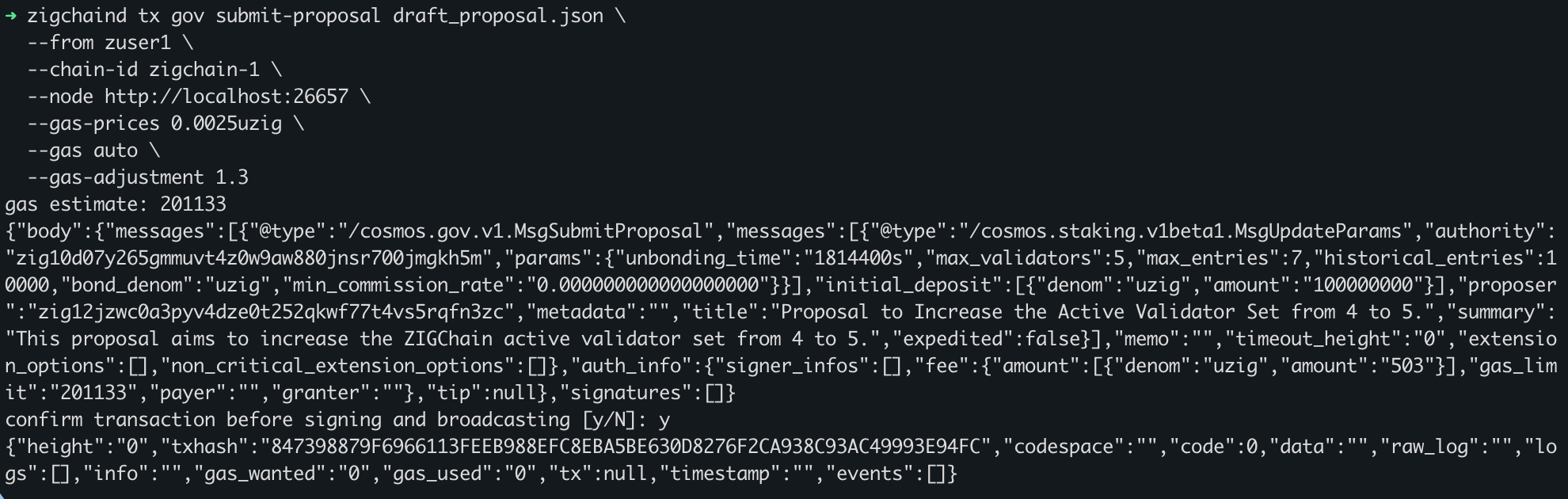
If you see the error:
expected gov account as only signer for proposal message
It means that the authority in your proposal doesn't match the actual governance module account. Double-check the value in Configure Authority Field When Required and try again.
Confirm Your Governance Proposal
After broadcast, query the governance module to read your new proposal ID and status. Use the list command when you do not know the ID yet; use the single-proposal query when you already have it from the submit output.
Once submitted, retrieve your proposal id:
- Mainnet
- Testnet
- Local
zigchaind query gov proposals \
--chain-id zigchain-1 --node https://public-zigchain-rpc.numia.xyz
zigchaind query gov proposals \
--chain-id zig-test-2 --node https://public-zigchain-testnet-rpc.numia.xyz
zigchaind query gov proposals \
--chain-id zigchain-1 --node http://localhost:26657
The proposals list shows every open and closed vote on that network. Find the highest ID or search by title metadata to locate the entry you just submitted.
Or fetch a specific one:
- Mainnet
- Testnet
- Local
zigchaind query gov proposal $PROPOSAL_ID \
--chain-id zigchain-1 --node https://public-zigchain-rpc.numia.xyz
zigchaind query gov proposal $PROPOSAL_ID \
--chain-id zig-test-2 --node https://public-zigchain-testnet-rpc.numia.xyz
zigchaind query gov proposal $PROPOSAL_ID \
--chain-id zigchain-1 --node http://localhost:26657
A successful response includes your proposal status, deposit requirements, and voting window. This confirms your governance proposal was registered on-chain.
Output example:
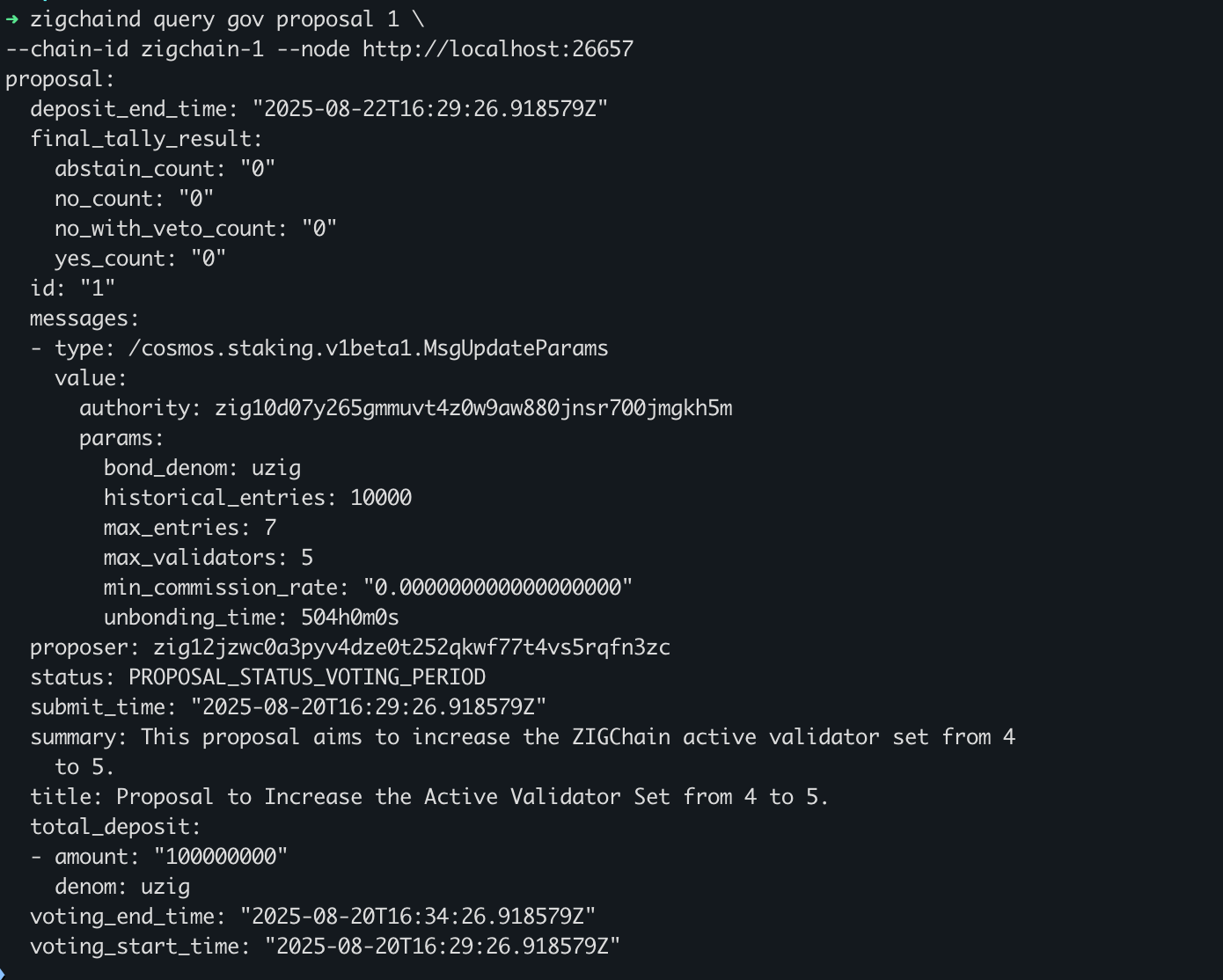
Share the proposal ID with voters once you verify the on-chain metadata matches what you intended. Track deposit and voting progress in explorers or with the same query commands above.
Common Questions
What should I do when inline metadata exceeds 255 characters?
Use base64-encoded draft_metadata.json or an IPFS URI instead of inline JSON. See Update Metadata Field for the encoding options.