Bridge
The ZIGChain Bridge makes it simple to move your assets across chains — quickly, affordably, and securely.
You can easily transfer ZIG, USDC, and other supported tokens between ZIGChain and multiple networks in just a few clicks.
How It Works — Step by Step
1. Link your origin wallet
-
Start by connecting the wallet that currently holds your tokens — your origin wallet.
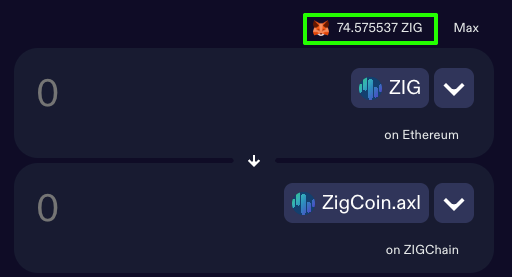
Choose the asset and the networks you’ll use for this transaction, following a simple “From → To” logic.Example: Bridging ZIG from your Ethereum wallet (origin) to your ZIGChain wallet (destination).
-
Click Connect Wallet to link your wallet to the ZIGChain Hub.
Once connected, you’ll see the maximum transferable amount for the selected token displayed on top.
2. Enter a valid amount
-
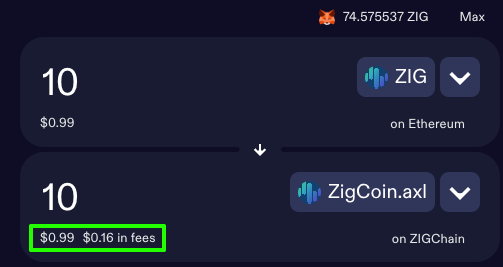
In the upper panel, enter the amount you’d like to bridge.
You can also click Max to send all available tokens.💡 Tip: Ensure you have enough native currency (like ETH on Ethereum) to cover gas fees.
-
Next, review:
- The amount you’ll receive, and
- The estimated bridge fee, which updates automatically based on network conditions.
-
When ready, click Send.
3. Set your destination wallet
Now it’s time to connect the wallet that will receive your tokens — your destination wallet.
-
Click the large Set Destination Wallet button and follow the prompts to connect.
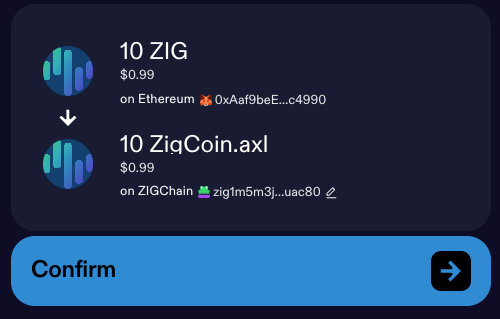
Before confirming, carefully review all transaction details. -
When everything looks correct, click Confirm.
-
Your origin wallet will then prompt you to approve the transaction.
Some wallets may require multiple confirmations, so keep an eye on your wallet notifications.
4. Wait and track
-
Your transfer is now on its way.
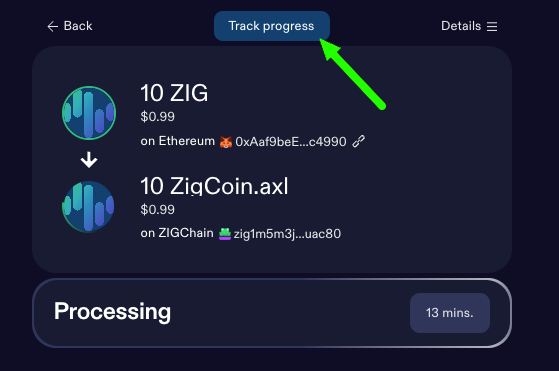
Processing may take around 20 minutes depending on network traffic. -
While you wait, you can monitor the status:
- Click Track Progress to open the transaction in the Skip Explorer.
- The status will show as Pending until the process completes.
5. Confirm receipt in your destination wallet
- Once the transaction is finalized, your bridged assets will appear automatically in your destination wallet.
🎉 You’ve successfully bridged your assets using ZIGChain Hub!
Additional Tips
- Double-check addresses before confirming any transaction.
- Keep a small balance of gas tokens for smooth bridging.
- For ZIG from Ethereum, choose ZigCoin.axl — it automatically converts to native ZIG on ZIGChain.