Tokenomics Transparency Dashboard
TL;DR: The Tokenomics Transparency Dashboard at hub.zigchain.com/transparency shows how much ZIG the tokenomics program has acquired, retired and designated to the Ecosystem Pool, cycle by cycle, with links to verify each wallet on chain.
Overview
The Tokenomics Transparency Dashboard is the ZIGChain Hub page that reports completed on-chain activity under the ZIG Tokenomics program. The dashboard is for ZIG Token holders, validators and anyone who wants to follow the monthly acquisition and governance cycle. Reading the Tokenomics Transparency Dashboard needs no wallet connection. Open it from the Tokenomics item in the Hub menu, or go straight to hub.zigchain.com/transparency.
Key Concepts
- Market Acquisition: A purchase of ZIG on the market by ZIG Markets. The timing, size and method are at ZIG Markets' discretion, and no acquisition is automatic or guaranteed.
- Cycle: One monthly round of acquisition and governance. The dashboard labels cycles C1, C2, C3 and so on, with the month of each cycle.
- Community Pool Wallet: The ZIGChain community pool, the on-chain community pool account of the Cosmos SDK distribution module rather than a custom address. The Community Pool Wallet receives acquired ZIG and holds it for governance-approved uses.
- Retirement Wallet: The wallet that receives ZIG retired by a passed governance vote. ZIG in this wallet is permanently retired and excluded from circulating supply.
- Ecosystem Pool: The long-term pool of acquired ZIG kept for ecosystem growth. Ecosystem Pool ZIG remains in the Community Pool Wallet, and deployments from the pool need a governance-approved proposal.
How the Monthly Cycle Works
The ZIG Tokenomics program links ZIG Markets revenue to the ZIG Token through a monthly cycle. The Tokenomics 2.0 Whitepaper (Section 5) defines the cycle that the Tokenomics Transparency Dashboard reports on:
- Acquisition: ZIG Markets may use a portion of realized revenues to acquire ZIG on the market. The acquired ZIG goes to the Community Pool Wallet.
- Split: 50% of the acquired ZIG flows automatically to the Ecosystem Pool. The other 50% goes to a retirement vote.
- Governance vote: ZIGChain validators vote on whether to retire that portion. The vote is a standard proposal in the ZIGChain governance module, not an expedited one. Follow the votes on Governance Proposals on ZIGChain Hub.
- Outcome: When the proposal passes, the ZIG moves automatically from the Community Pool Wallet to the Retirement Wallet. When the proposal fails, the ZIG may instead go to the Ecosystem Pool or another governance-approved destination. Either way, acquired ZIG stays inside the ecosystem.
The retirement vote uses these parameters:
| Parameter | Value |
|---|---|
| Eligible voters | ZIGChain validators |
| Vote weighting | Stake-weighted voting |
| Threshold to pass | At least 51% of non-abstaining votes |
| Voting window | 96 hours from the start of the voting period |
| Result | Published on chain, publicly verifiable |
Each cycle follows a four-week timeline:
- Weeks 1–3: ZIG Markets carries out the market acquisition. The governance proposal for the acquired ZIG is submitted and enters the deposit period.
- Week 3: The proposal proceeds through the deposit, discussion and voting phases, culminating in the voting window.
- Week 4: The voting result is published on chain. The ZIG moves to the Retirement Wallet or stays in the Community Pool, according to the outcome.
Governance can adjust this timing.
Dashboard Header
The Hub page is headed ZIG Tokenomics Transparency. The header shows the network the data comes from (zigchain-1), the latest block and the time since the last update. A green dot shows that the chain is producing blocks. Two buttons sit next to the title:
- Tokenomics Paper opens the Tokenomics 2.0 Whitepaper, which defines the program.
- ADD FUNDS opens a form to contribute ZIG to the Community Pool Wallet. See Add Funds to the Community Pool.

Add Funds to the Community Pool
The ADD FUNDS form on the Tokenomics Transparency Dashboard contributes ZIG directly to the Community Pool Wallet. The form runs in three steps: Amount, Review and Done.
- Select ADD FUNDS in the dashboard header. The Add Funds to the Community Pool form opens.
- Check the VERIFIED DESTINATION · COMMUNITY POOL WALLET address. The ↗ button next to the address opens the wallet in Range App.
- Enter the ZIG amount under Amount to Contribute, or select MAX. to use the full balance. The Available line shows the ZIG balance of the connected wallet.
- Optionally, add a Public memo. The memo is recorded on chain with the contribution, so leave it blank to stay anonymous.
- Select REVIEW CONTRIBUTION to move to the Review step.
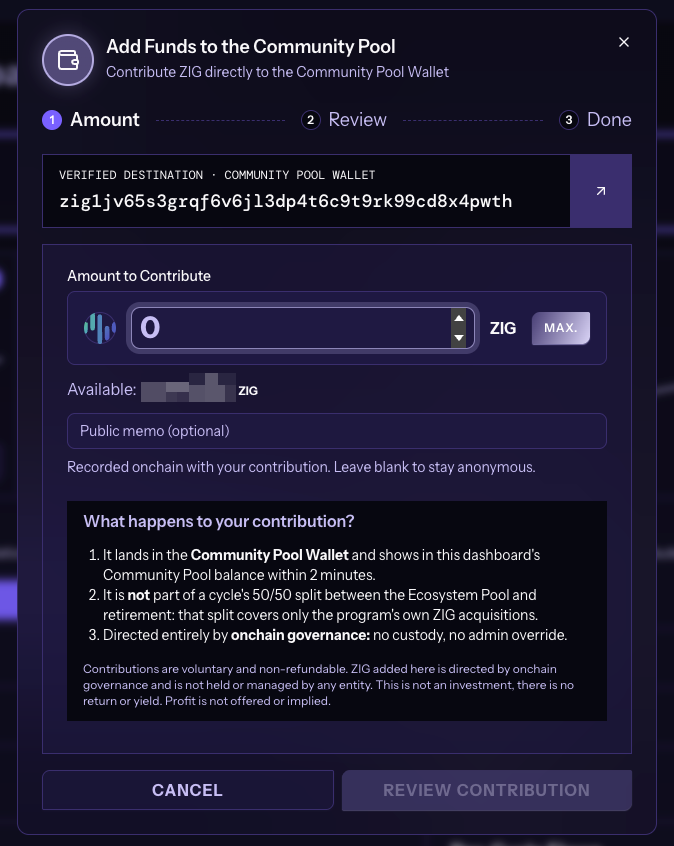
The form's What happens to your contribution? box explains how the Community Pool Wallet treats a contribution:
- The contribution lands in the Community Pool Wallet.
- The contribution is not part of a cycle's 50/50 split between the Ecosystem Pool and retirement. That split covers only the program's own ZIG acquisitions.
- On-chain governance directs the contributed ZIG, with no custody and no admin override.
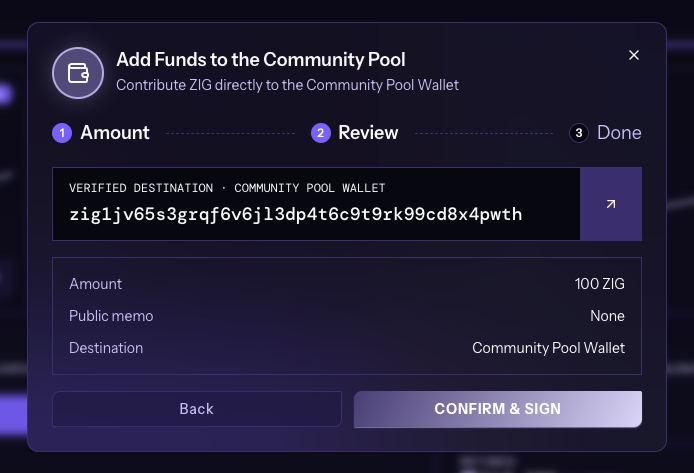
- Check the Amount, Public memo and Destination in the Review step, then select CONFIRM & SIGN. Select Back to change the amount or memo.
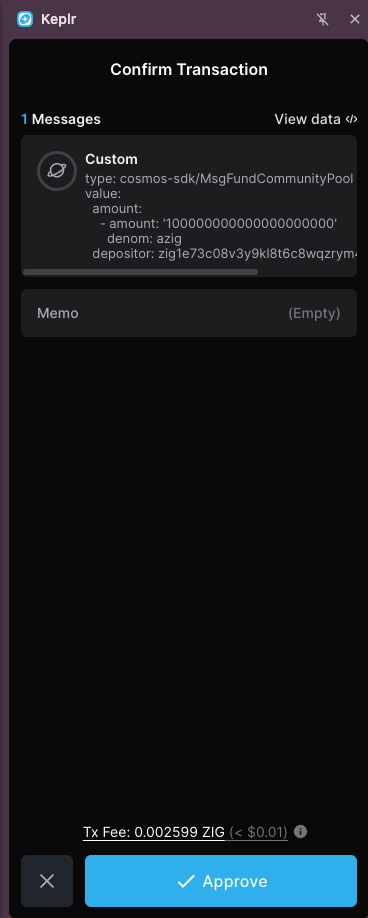
- Approve the transaction in the wallet. Keplr shows a
cosmos-sdk/MsgFundCommunityPoolmessage with the amount inazig, the memo and the transaction fee.
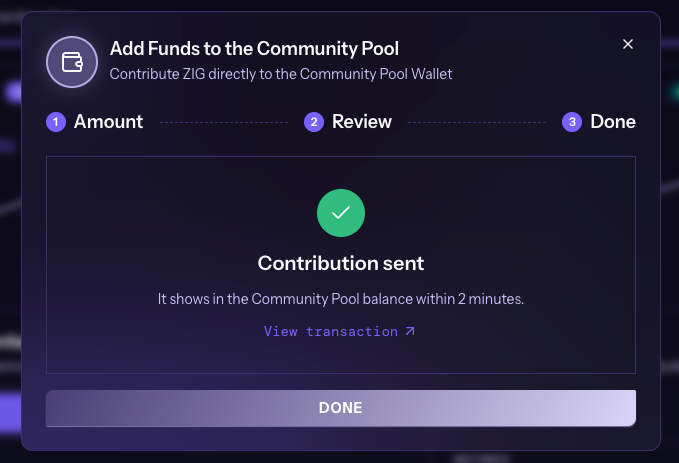
- The Done step shows Contribution sent. Select View transaction to open the transaction, then select DONE to close the form. The contribution shows in the Community Pool balance within 2 minutes.
Contributions are voluntary and non-refundable. ZIG added through the form is directed by on-chain governance and is not held or managed by any entity. A contribution is not an investment, and there is no return or yield. Profit is not offered or implied.
ZIGChain Live Governance
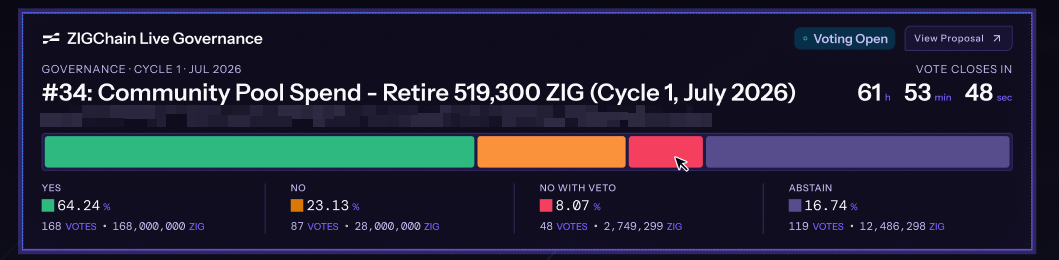
The ZIGChain Live Governance panel shows the retirement vote of the current cycle while voting is open. When no vote is running, the panel reads "No governance vote is currently active."
During a vote, the panel shows:
- The cycle and month (for example GOVERNANCE · CYCLE 1 · JUL 2026), the proposal number and title, and the proposal description.
- A Voting Open badge and a View Proposal button that opens the proposal.
- A VOTE CLOSES IN countdown in hours, minutes and seconds.
- A bar and a tally for YES, NO, NO WITH VETO and ABSTAIN, each with its percentage, number of votes and ZIG voting power.
Dashboard Summary Cards
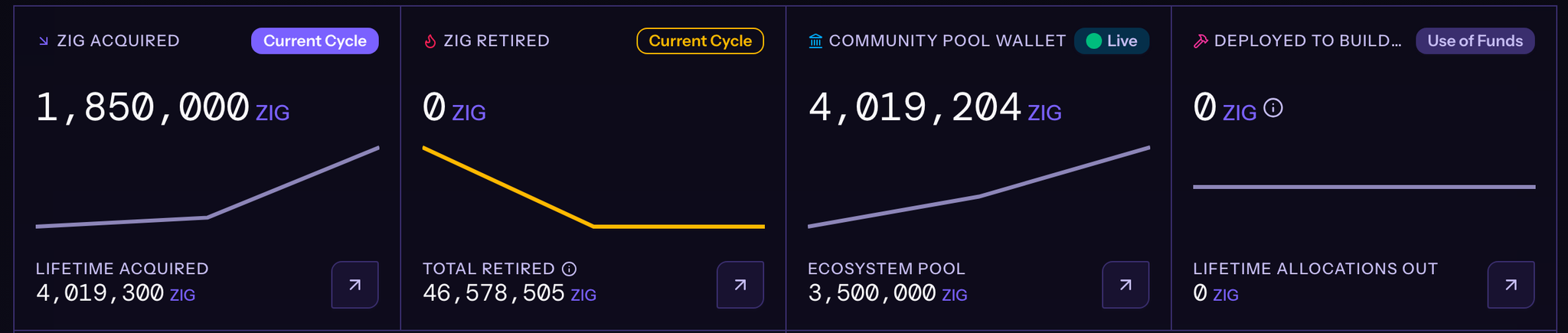
Four cards at the top of the Tokenomics Transparency Dashboard give the current figures. Each card has a trend line and a ↗ button that opens the card's wallet in Range App.
| Card | Main figure | Lower figure | Explorer link |
|---|---|---|---|
| ZIG ACQUIRED | ZIG acquired in the Current Cycle | LIFETIME ACQUIRED: all ZIG acquired by the program | Community Pool Wallet |
| ZIG RETIRED | ZIG retired in the Current Cycle | TOTAL RETIRED: all retired ZIG | Retirement Wallet |
| COMMUNITY POOL WALLET | Live balance of the Community Pool Wallet | ECOSYSTEM POOL: ZIG designated to the Ecosystem Pool | Community Pool Wallet |
| DEPLOYED TO BUILDERS | Use of Funds: Ecosystem Pool funds deployed to builders by governance-approved allocation | LIFETIME ALLOCATIONS OUT: all ZIG allocated out of the pool | Community Pool Wallet |
TOTAL RETIRED includes ZIG retired before the program started. The info icon next to TOTAL RETIRED shows the split between ZIG retired by the program and ZIG retired before it.
The two wallet addresses are:
- Community Pool Wallet:
zig1jv65s3grqf6v6jl3dp4t6c9t9rk99cd8x4pwth - Retirement Wallet:
zig14har2kjzze5adwprvwjtruf2lzvfta53wflpml
ZIG Supply Context
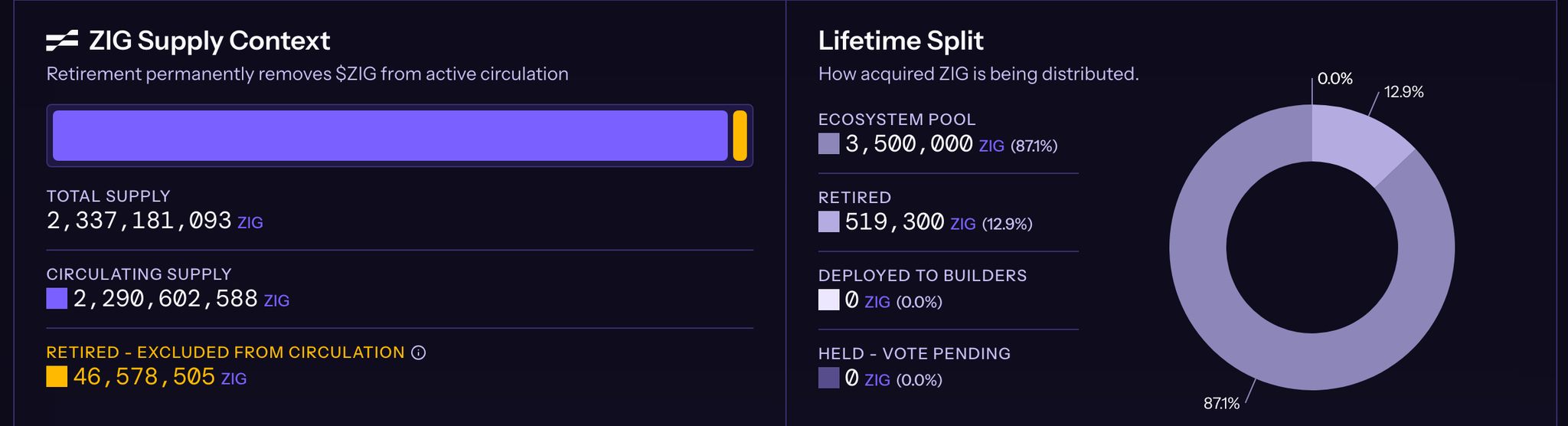
The ZIG Supply Context panel shows how retirement affects the ZIG supply. Retirement permanently removes ZIG from active circulation. A bar above the figures compares circulating supply with retired ZIG, and hovering over the bar shows each share as a percentage. The panel lists three figures:
- TOTAL SUPPLY: the total ZIG supply.
- CIRCULATING SUPPLY: the ZIG in active circulation.
- RETIRED - EXCLUDED FROM CIRCULATION: the retired ZIG. The info icon shows the same breakdown as TOTAL RETIRED.
Lifetime Split
The Lifetime Split panel shows how all acquired ZIG is distributed, as amounts, percentages and a ring chart:
- ECOSYSTEM POOL: ZIG designated to the Ecosystem Pool.
- RETIRED: ZIG retired by the program, without the ZIG retired before it.
- DEPLOYED TO BUILDERS: Ecosystem Pool funds deployed to builders.
- HELD - VOTE PENDING: acquired ZIG that waits for the result of the current governance vote.
Wallet Growth and Per-Cycle Flows
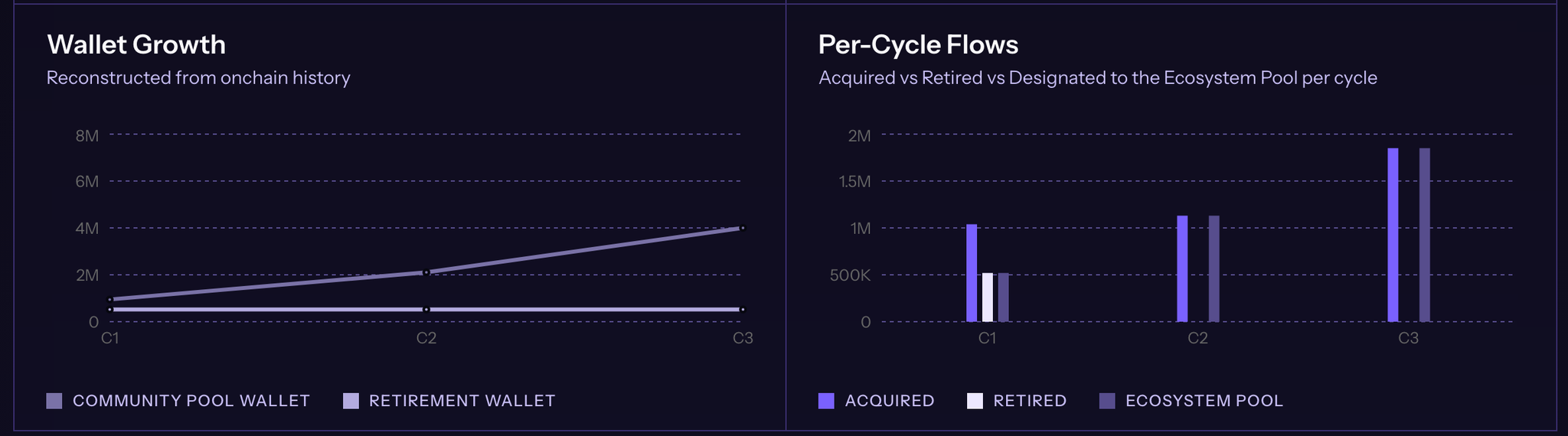
Two charts on the Tokenomics Transparency Dashboard show the history of the program by cycle:
- Wallet Growth plots the balances of the COMMUNITY POOL WALLET and the RETIREMENT WALLET at each cycle, rebuilt from on-chain history.
- Per-Cycle Flows compares the ZIG ACQUIRED, RETIRED and designated to the ECOSYSTEM POOL in each cycle.
Cycle Transparency
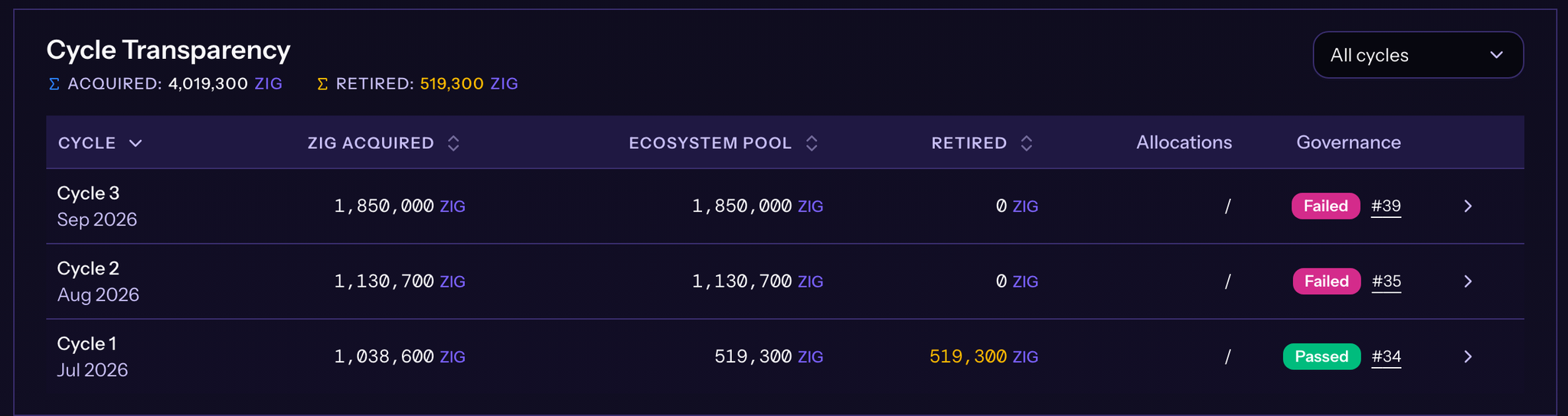
The Cycle Transparency table lists each cycle with its outcome. The totals for ACQUIRED and RETIRED across all cycles appear above the table. Use the All cycles menu to filter the list.
| Column | What it shows |
|---|---|
| CYCLE | The cycle number and its month |
| ZIG ACQUIRED | ZIG acquired in the cycle |
| ECOSYSTEM POOL | ZIG designated to the Ecosystem Pool in the cycle |
| RETIRED | ZIG retired in the cycle |
| Allocations | The number of Ecosystem Pool deployments linked to the cycle, such as 1 deployment, or / when there are none |
| Governance | The vote result (Passed or Failed) and the proposal number |
Select the CYCLE, ZIG ACQUIRED, ECOSYSTEM POOL or RETIRED header to sort the table. Select a proposal number to open that proposal in the Hub, or select the arrow at the end of a row to open the cycle details.
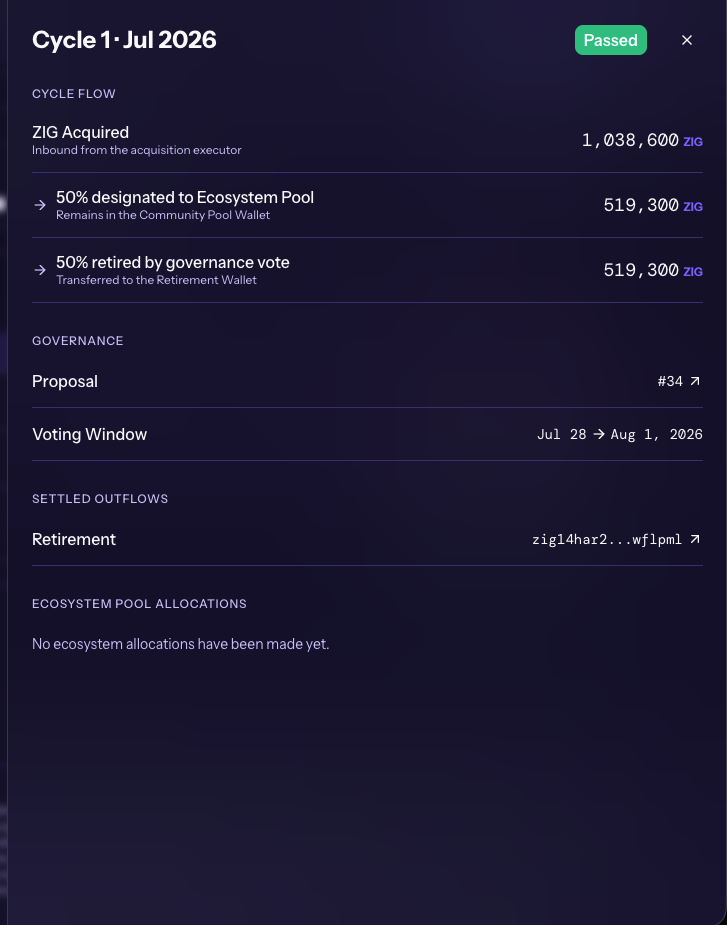
The cycle details open in a side panel on the right, headed with the cycle, its month and the vote result. The side panel has four parts:
- CYCLE FLOW: ZIG Acquired (inbound from the acquisition executor), the 50% designated to the Ecosystem Pool, which remains in the Community Pool Wallet, and the 50% retired by governance vote, which is transferred to the Retirement Wallet.
- GOVERNANCE: the Proposal number, with a link to the proposal, and the Voting Window dates.
- SETTLED OUTFLOWS: completed transfers out of the Community Pool Wallet, such as Retirement, with a link to the Retirement Wallet.
- ECOSYSTEM POOL ALLOCATIONS: Ecosystem Pool deployments for the cycle, or "No ecosystem allocations have been made yet."
Ecosystem Pool Allocations
The Ecosystem Pool Allocations panel lists deployments from the Ecosystem Pool, with the total ALLOCATED amount. The Foundation may propose deployments from the Ecosystem Pool every three months, or as required. Governance-approved allocations appear in the panel once the first deployment settles. Until then, the panel reads "No Ecosystem Pool funds have been deployed yet."

The dashboard is for informational purposes only and reports historical, completed on-chain activity under the ZIG Tokenomics program as described in the ZIG Tokenomics paper, which prevails in case of any discrepancy. It is not a commitment to future Market Acquisitions or Retirements from Active Ecosystem Circulation, which are discretionary, depend on validator governance outcomes, and may be modified, suspended, or discontinued at any time, with or without notice. No one should rely on past activity as an indication of future activity. The ZIG Token is a utility and governance token. It is not a security, share, or investment contract, and confers no right to profits, dividends, or distributions. Nothing on the dashboard constitutes an offer, solicitation, or financial, investment, legal, or tax advice.