Staking on ZIGChain Hub
TL;DR: On ZIGChain, staking through the Hub lets you delegate ZIG to validators, earn rewards, and vote on governance from one dashboard—stake, manage, unstake, and claim with a few clicks on the Staking page.
Overview
ZIGChain staking is the main way to secure the network and earn rewards on your ZIG Tokens. The Hub centralizes every action on the Staking page, so you can delegate, add stake, unstake, and claim rewards without switching tools.
Before you start, install a ZIGChain-compatible wallet such as Keplr and fund it with ZIG. If you need a wallet first, follow Set Up a ZIGChain Wallet. For validator roles and chain-level rules see Staking on ZIGChain; for how APR and commission affect returns see Staking APR on ZIGChain.
Key Concepts
- Validator: An operator that runs nodes and helps secure ZIGChain; delegators choose validators based on commission and voting power shown on the Hub.
- Delegator: A token holder who stakes ZIG with one or more validators and earns a share of block rewards minus the validator commission.
- Commission: The percentage fee a validator keeps from rewards before the remainder is paid to delegators; compare commission on the validator list before you delegate.
- Voting power: The share of total bonded stake a validator holds; higher voting power often means more network influence but is not the only factor when you pick a validator.
- Bonded tokens: The total ZIG delegated to a validator, including stake from all delegators; the Staking page shows this beside voting power and commission.
- Unbonding period: The mandatory 21-day wait after you unstake before tokens return to your spendable wallet balance; during this time tokens appear under Unstaking on the Hub.
How ZIGChain Staking Works
-
Install and Fund a Wallet
Use a ZIGChain-compatible wallet (such as Keplr) and fund it with ZIG Token. If you do not have a wallet yet, set one up before you delegate (see Related Topics). -
Delegate to Validators
Choose one or more validators to stake your tokens with. Validators help secure the network, and delegators (you) earn a share of the rewards. Review voting power, bonded tokens, and commission on the validator list before you click Stake. -
Earn Rewards and Voting Rights
- Rewards accumulate automatically and can be claimed at any time from the Staking page or per validator.
- Staking also gives you voting power in governance proposals while your tokens remain bonded.
All staked tokens take 21 days to unstake. Plan ahead if you need liquid ZIG for transfers or bridge actions.
How to Stake
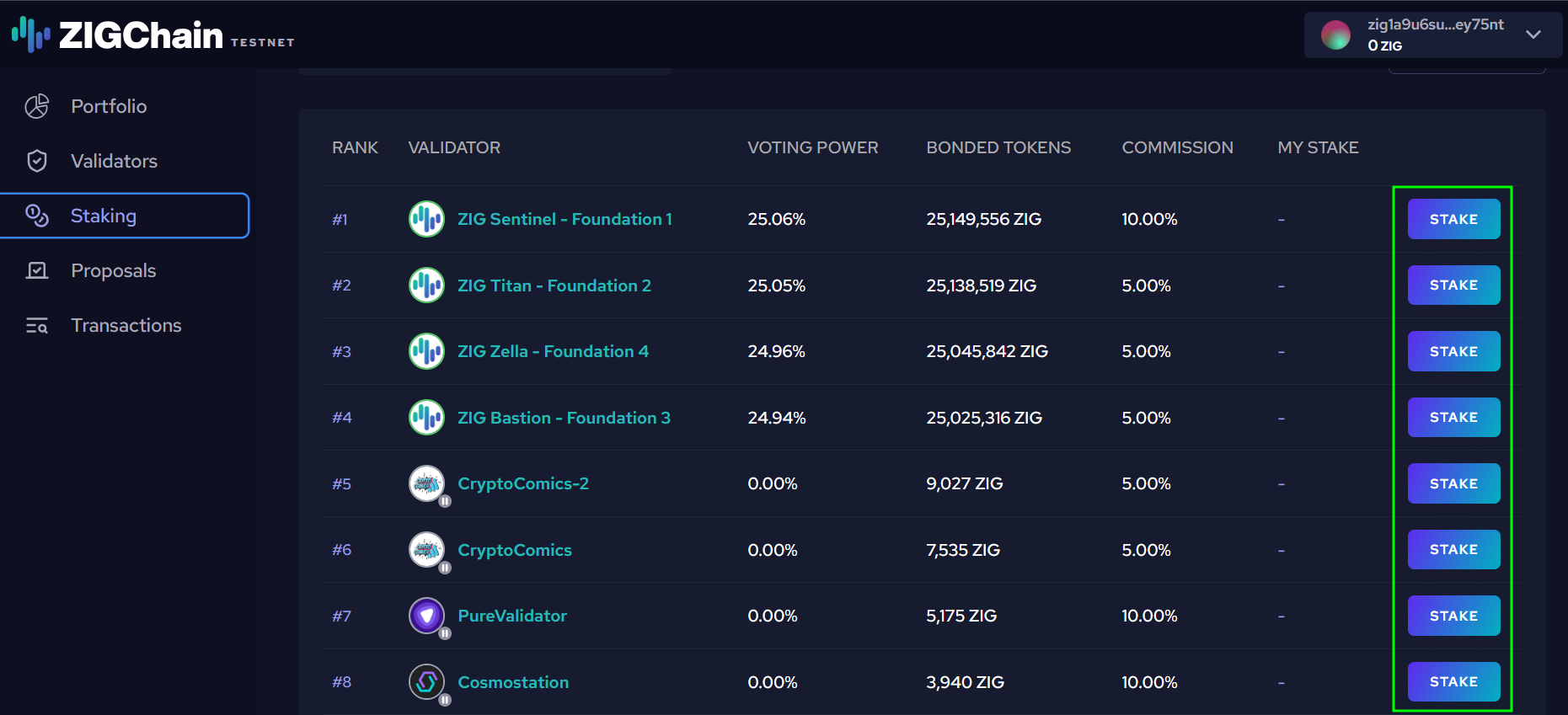
- Go to the Staking page.
- Browse the list of validators. You'll see:
- Voting power (how much stake they have).
- Bonded tokens (total ZIG delegated).
- Commission (the validator's fee).
- Click Stake next to your chosen validator.
-
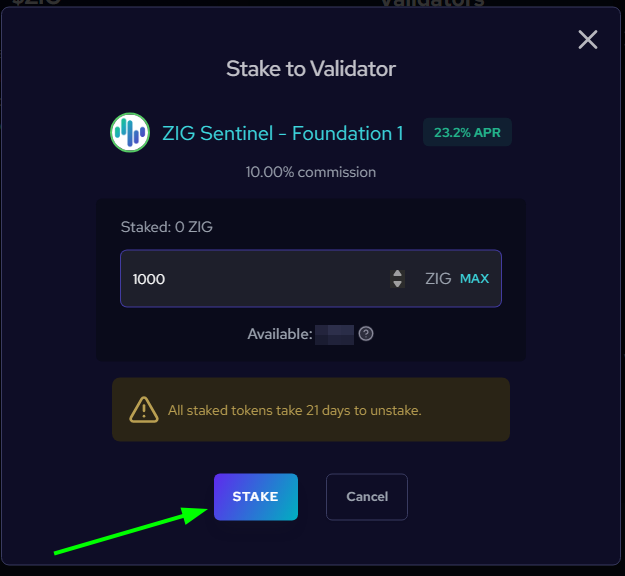
In the Stake to Validator window:
- Enter the amount of ZIG you want to stake (or press MAX if you want to stake all your available tokens).
- Review details like available balance, validator commission, and APR.
- Confirm by clicking Stake.
-
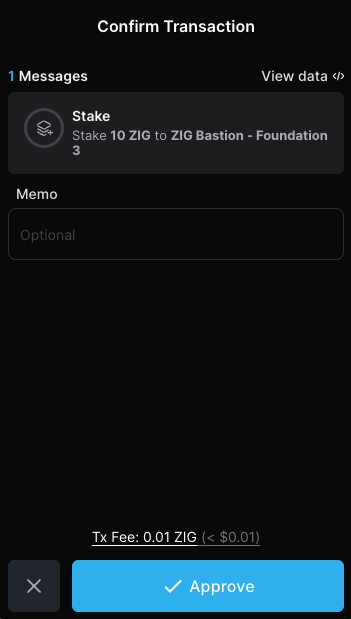
Approve the transaction in your wallet.
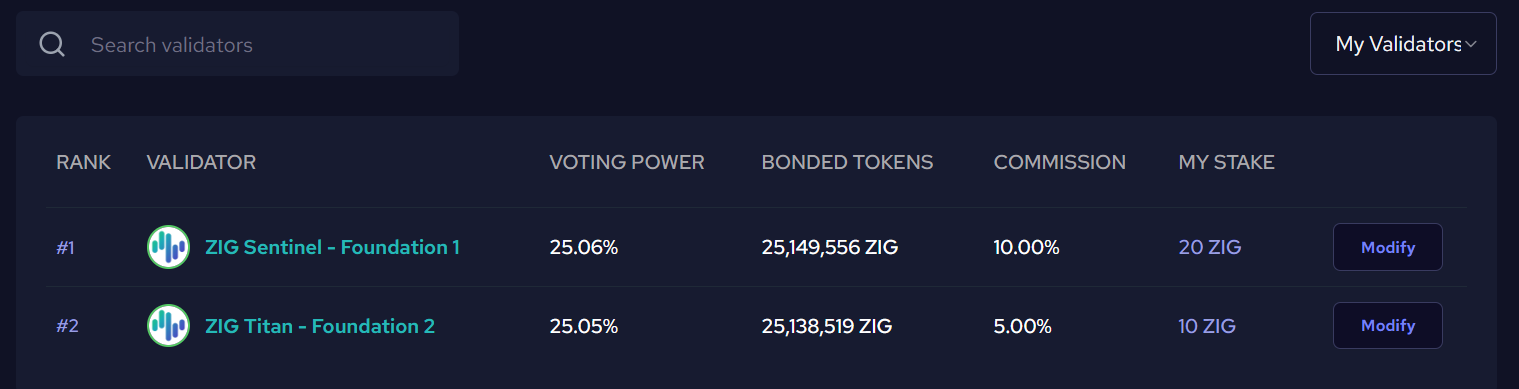
Your staked balance will now appear under My Validators.
Automatic Reward Claiming
If you have unclaimed rewards from a validator and you stake or unstake tokens with that same validator, your rewards will be automatically claimed first. This happens behind the scenes to ensure accurate reward calculations, since your staked amount will change. While this action may not be clearly shown in the transaction summary, you can verify it by checking the event logs of your delegate/undelegate transaction.
How to Manage Your Stake
Once you've staked, the validator row shows a Modify button instead of Stake.
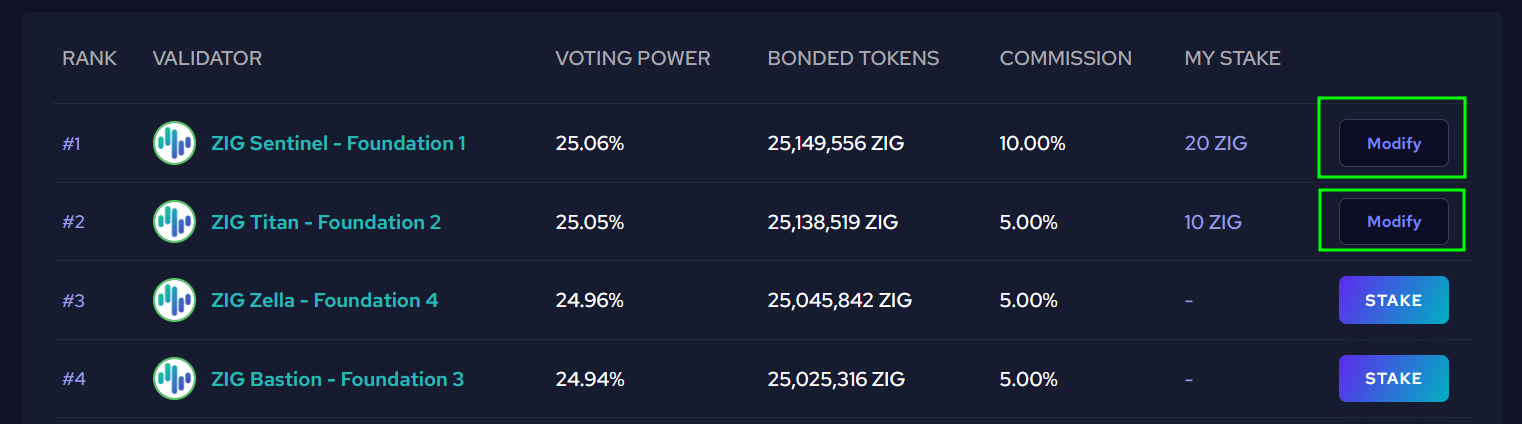
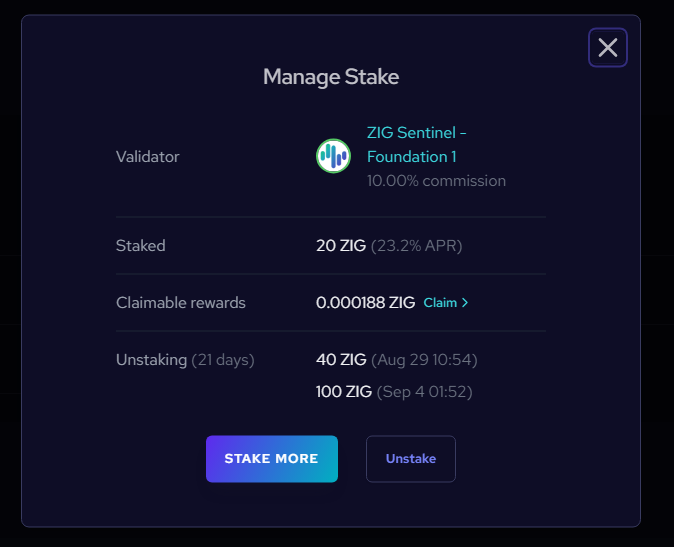
Click Modify to open the Manage Stake panel, where you can:
- Stake More: Add additional tokens to your existing delegation.
- Unstake: Withdraw some or all of your tokens (21-day unbonding period applies).
- Claim Rewards: Collect your accumulated staking rewards into your wallet.
How to Unstake
-
Go to the Staking page.
-
Find your validator under My Validators.
-
Click Modify → Unstake.
-
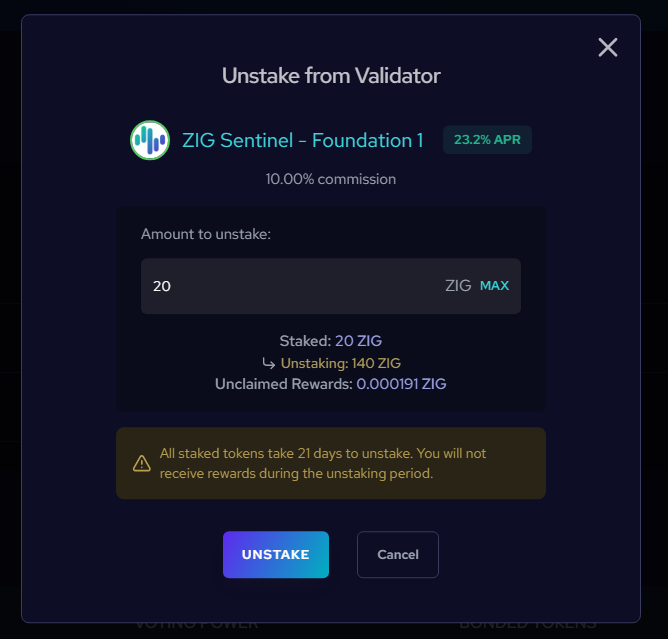
Enter the amount you want to undelegate and confirm.
- Approve the transaction in your wallet.
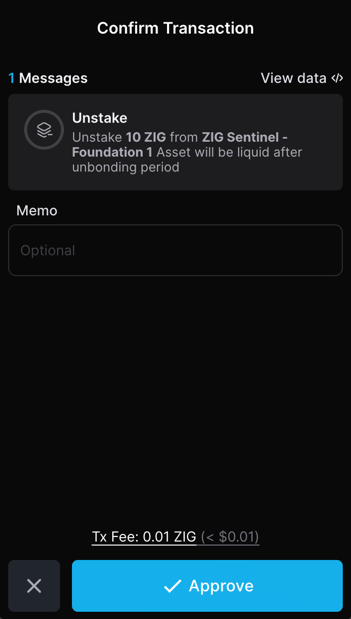
Your tokens will show under Unstaking. After the unbonding period (21 days), they will become available in your balance.
If you have unclaimed rewards when you unstake, they will be automatically claimed first before the unstaking occurs. This ensures your rewards are calculated correctly based on your current stake.
How to Claim Rewards
You have two ways to manually claim your rewards:
Rewards are also automatically claimed whenever you stake or unstake tokens from a validator. This happens automatically to keep reward calculations accurate.
1. Claim All (from Staking Page)
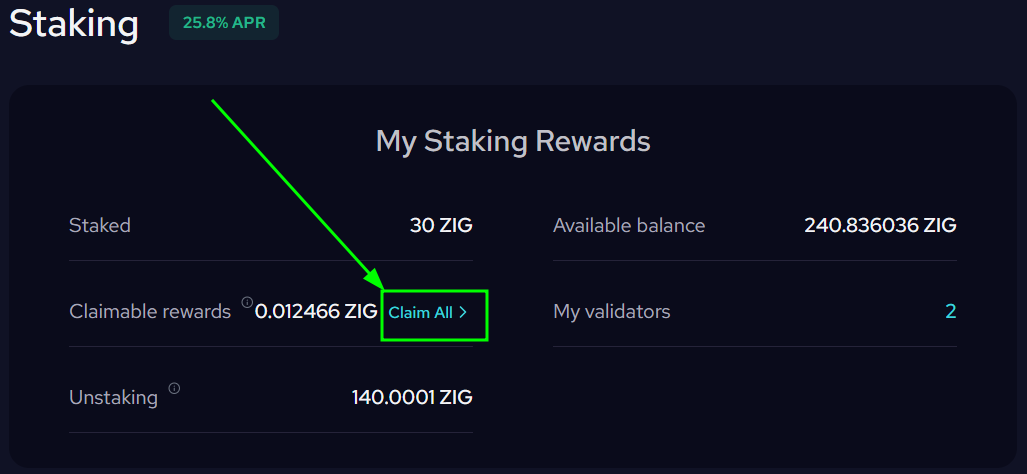
- At the top of the Staking page, under Claimable Rewards, click Claim All.
- Confirm the transaction in your wallet.
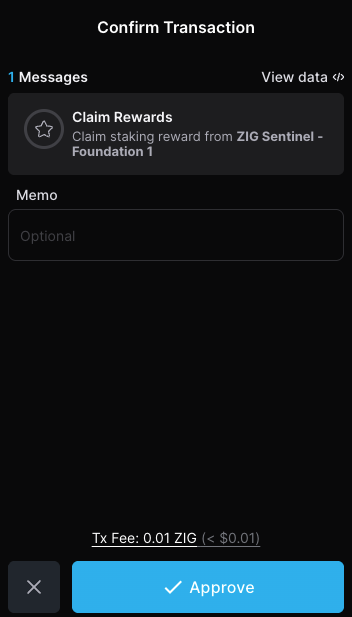
- All available rewards from your validators will be added to your balance.
2. Claim from Individual Validator
- Click Modify next to a validator.
- In the Manage Stake panel, click Claim under Claimable Rewards.
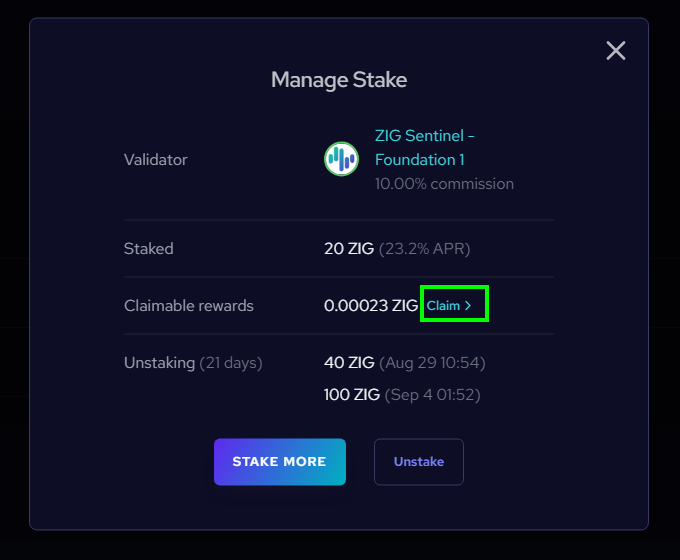
- Confirm the transaction in your wallet.
Related Topics
- Set Up a ZIGChain Wallet
- ZIGChain Hub
- Governance Proposals on ZIGChain Hub
- Staking Redelegation on ZIGChain
- Delegator's FAQ
Start staking now at ZIGChain HUB.