Governance Proposals on ZIGChain Hub
TL;DR: Use Hub to browse and vote on ZIGChain proposals. Track status, deposits, quorum, and results on one page.
Overview
ZIGChain proposals are on-chain votes you view and act on through Hub. The Proposals page lists every proposal in one place. Search by title, filter by status, and open any row for full voting data. To submit one of the Hub-supported proposal types directly from your browser, see Create a ZIGChain Proposal in the Hub. This guide is for token holders who follow ZIGChain proposals on Hub. You need a connected wallet to deposit or vote.
Staked ZIG is required before you cast a vote on an active proposal. Hub shows each item through its full life cycle on one detail page. Watch deposit progress, read vote totals, and check quorum before you decide. The same view works for live votes and past results you review later. Stake ZIG through Staking on ZIGChain Hub if you need voting power before an item enters Voting Period.
For proposal types, deposit rules, and full voting mechanics, see ZIGChain Governance.
Key Concepts
- Deposit Period: The early phase where a ZIGChain proposal must collect enough ZIG deposits before it can enter voting on chain.
- Voting Period: The window when staked token holders may cast Yes, No, No with Veto, or Abstain on an open ZIGChain proposal.
- Quorum: The least share of staked voting power that must take part before a ZIGChain proposal result is valid on chain.
- NoWithVeto: A final failed state when veto votes on a ZIGChain proposal exceed the network veto limit set by params.
- Validator Delegation: The rule where your stake follows your validator's vote when you do not cast your own vote on Hub.
- Voting Power: The weight Hub assigns to your vote based on how much ZIG you have staked with your chosen validator on chain.
- Status Badge: The colored label on a detail page that shows whether a ZIGChain proposal is in deposit, voting, passed, or failed state.
Understanding ZIGChain Proposals on Hub
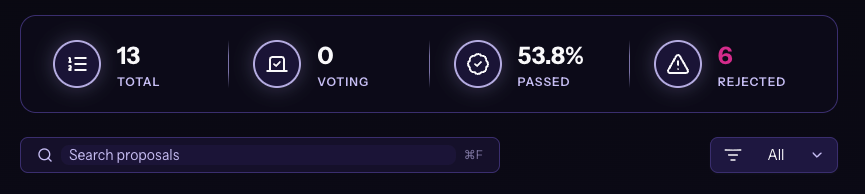
The Proposals page shows every ZIGChain proposal on Hub. Summary cards at the top count items by state. Search, filters, and the main table help you scan status and open any row for detail. Scan the summary cards before you dive into the table.
Counts update as new proposals enter deposit or voting on chain. Use search when you know part of a title, such as an upgrade or params change. The table compares end times and status labels without opening each item. Click a row to read descriptions, metadata, proposer details, and voting Times on the detail page.
Summary Cards
Four cards sit at the top of the page.
- Total: All ZIGChain proposals currently listed on Hub.
- Voting: ZIGChain proposals that are in the voting period right now.
- Passed: ZIGChain proposals the community approved and that met all rules.
- Rejected: ZIGChain proposals that failed quorum or majority requirements on chain.

Search and Filter Options
- Search Bar: Find ZIGChain proposals by title when you know part of the name.
- Filter Dropdown: Filter the list by All, Ongoing, Rejected, or Passed.
Proposals Table
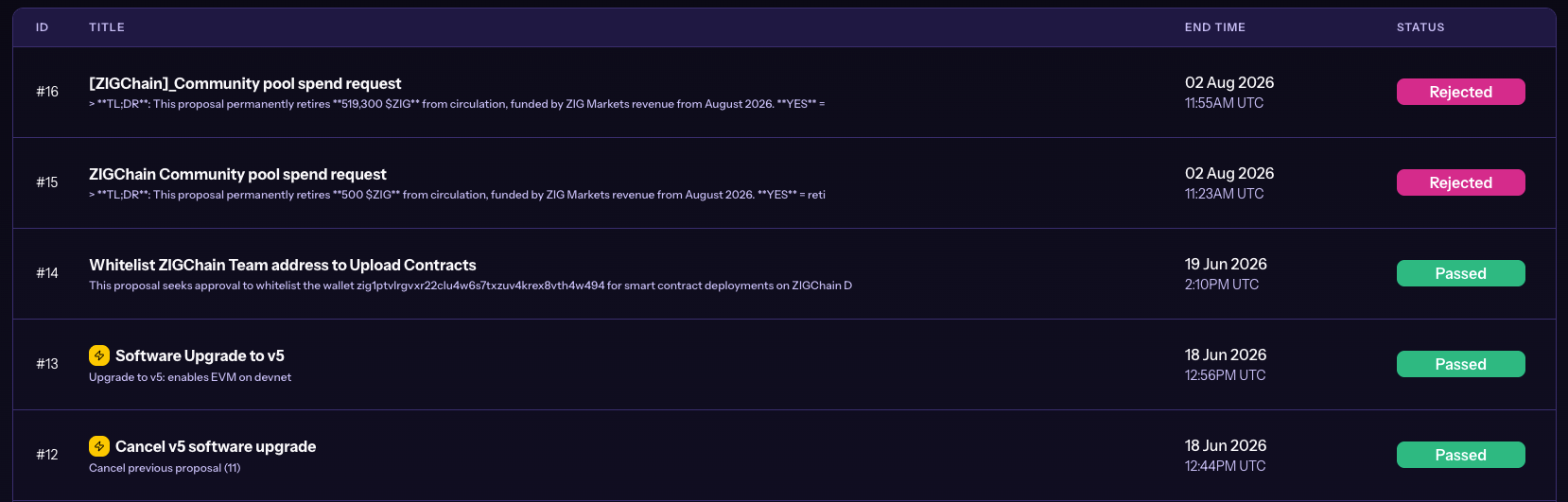
The table lists every ZIGChain proposal with these columns.
- ID: Unique proposal identifier for quick reference (e.g., #13, #12).
- Title: Short summary of the change (e.g., "Upgrade to 1.2.0").
- End Time: Date and time in UTC when the current status ends or ended.
- Status: Current state of the ZIGChain proposal in the life cycle.
Proposal Statuses
Each ZIGChain proposal shows one of these states in the table and on its detail page.
- Deposit Period: The proposal is still gathering deposits before voting can begin.
- Voting Period: The proposal is open and community members can cast votes now.
- Passed: The community approved the proposal and it met every network requirement.
- Rejected: The proposal did not pass because quorum or majority rules were not met.
- NoWithVeto: The proposal failed after the veto vote share crossed the veto threshold.
How to Explore ZIGChain Proposals
Follow these steps to browse ZIGChain proposals on Hub. Deposit during the deposit period. Vote once voting opens.
Step 1 - Access the Proposals Page
- Go to the Proposals page.
- Review the summary cards showing the total count of proposals and their status distribution.
Step 2 - Browse and Search Proposals
- Use the Search Bar: Type keywords (e.g., "upgrade", "gas", "wasm").
- Apply Filters: Pick All, Ongoing, Rejected, or Passed from the dropdown.
- Browse the Table: Scroll to view ZIGChain proposal details.
Step 3 - Review Proposal Details
- Click any proposal row to open the detail view.
- Open the detail page for full ZIGChain proposal data.
- Read each section to learn:
- What changes are proposed.
- Why the changes are needed.
- Impact on the network.
- Voting results and timeline.
- Technical details and metadata.
Step 4 - Deposit to Proposals in Deposit Period
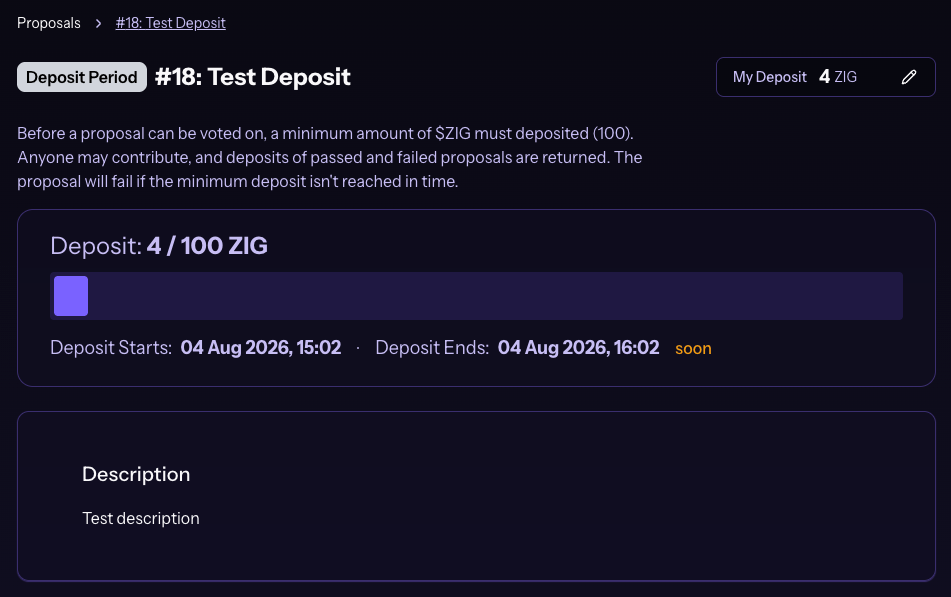
During Deposit Period, add ZIG to help meet the minimum deposit.

- Check deposit status: View the progress bar for current and target ZIG.
- Review deposit requirements: Note the minimum amount and deadline.
- Click "DEPOSIT": Start your deposit.
- Enter deposit amount: Choose how many ZIG to add.
- Confirm the transaction: Approve in your connected wallet.
- View updated deposit: Your amount appears after approval.
Deposits for passed and failed ZIGChain proposals are returned. The proposal fails if the minimum deposit is not met in time.
Step 5 - Vote on Active Proposals
With staked ZIG and an open Voting Period, you can vote on ZIGChain proposals.
- Check if you can vote: Staked ZIG is required.
- Review the proposal: Read details before you vote.
- Cast your vote: Pick Yes, No, No with Veto, or Abstain.
- Confirm the transaction: Approve the vote in your wallet.
If you do not vote, your vote automatically follows your validator's choice. Only staked tokens count toward voting power on ZIGChain proposals. See Validator Delegation below for how that works.
Step 6 - Understand Proposal Information
The detail page includes these sections.
Proposal Header
- Proposal ID and Title: Number and title (e.g., #13 Upgrade to 1.2.0).
- Status Badge: Current state (PASSED, REJECTED, VOTING PERIOD, DEPOSIT PERIOD, etc.).

Voting Results Summary
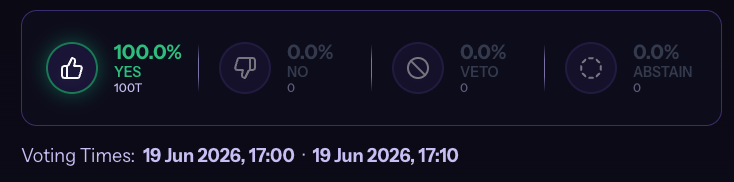
- Vote Distribution: Four boxes with share and count per option.
- Yes: Votes for the proposal (with percentage and total count).
- No: Votes against the proposal.
- Veto: Votes with veto power.
- Abstain: Neutral votes that count toward quorum.
- Voting Times: Start and end times for voting.
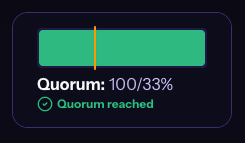
Quorum Information
- Quorum Status: Participation rate with a progress bar.
- Minimum Threshold: Quorum required for the proposal to pass.
Proposal Details
- Description: What the proposal aims to do.
- Details:
- Metadata:
- Title: The proposal title.
- Summary: Short proposal summary.
- Proposer: Address of the submitter.
Step 7 - Stay Informed
- Active Proposals: Check ZIGChain proposals with Voting Period status to see current community decisions.
- Historical Proposals: Review Passed and Rejected ZIGChain proposals to understand network evolution.
- Future Proposals: Monitor Deposit Period ZIGChain proposals to see what's coming next.
- Vetoed Proposals: Review NoWithVeto ZIGChain proposals for community concerns.
How Voting Works on the Hub
Voting Requirements
- Staked Tokens: You must stake ZIG with an active validator before you can vote on ZIGChain proposals.
- Active Proposals: You can only vote on proposals in Voting Period status.
- Connected Wallet: Link your wallet to Hub so the site can submit your vote transaction on chain.
Voting Options
Pick one option when you vote on ZIGChain proposals from the detail page.
- Yes: Signal support for the change the ZIGChain proposal describes.
- No: Signal opposition when you do not want the change to pass.
- No with Veto: Signal strong opposition; enough veto weight can block the item.
- Abstain: Stay neutral while still adding your stake toward quorum on chain.
Validator Delegation
- Your Vote Counts: When you vote, your choice overrides your validator's vote on that ZIGChain proposal.
- Automatic Delegation: When you skip voting, your vote follows your validator's recorded vote.
- Voting Power: Your power on Hub equals the ZIG amount you have staked with your validator.
- Independent Choice: You may vote differently from your validator when you disagree with them.
Common Questions
What happens to deposits when a proposal passes or fails?
Deposits return for both passed and failed ZIGChain proposals once the process ends on chain. If the minimum deposit is not met before the deposit period closes, the item fails and your ZIG still returns to you. Hub reflects the final state on the detail page after the chain updates the record.
What happens if I do not vote on an active proposal?
Your stake follows your validator's choice on that ZIGChain proposal. Cast your own vote on Hub before voting ends when you want your voice to differ from your validator. Your manual vote replaces the delegated vote for that item only.
Do I need staked ZIG before I can vote on Hub?
Yes. You must stake ZIG with an active validator before Hub can count your vote on ZIGChain proposals. Unstaked balance alone does not grant voting power on the governance page. Connect the wallet that holds your stake before you open the vote panel on a live item.
How do validator votes interact with mine on a proposal?
When you vote on Hub, your choice replaces your validator's vote for that ZIGChain proposal only. When you skip voting, your stake counts toward the option your validator selected on chain. See Key Concepts for short definitions of quorum, veto, and voting power.
Related Topics
- Create a ZIGChain Proposal in the Hub
- ZIGChain Governance
- ZIGChain Hub
- Staking on ZIGChain Hub
- Tokenomics Transparency Dashboard
Start exploring governance now at ZIGChain Hub Proposals.