Create a ZIGChain Proposal in the Hub
TL;DR: Create a ZIGChain proposal directly in the Hub on the Create New Proposal page. Pick a type, add details and a deposit, then preview and confirm on-chain—no CLI required.
Overview
You can create a ZIGChain proposal directly in the Hub instead of drafting it with zigchaind. The Create New Proposal page walks you through the proposal type, name, description, type-specific fields, deposit, and on-chain review in a single form.
This flow suits token holders and builders who want to submit supported proposal types from a browser. Connect a wallet with enough ZIG to cover the initial deposit and gas fees. Before you submit, the Hub shows live values at the top of the page for the create deposit, the deposit required to reach voting, the voting period, and the pass threshold.
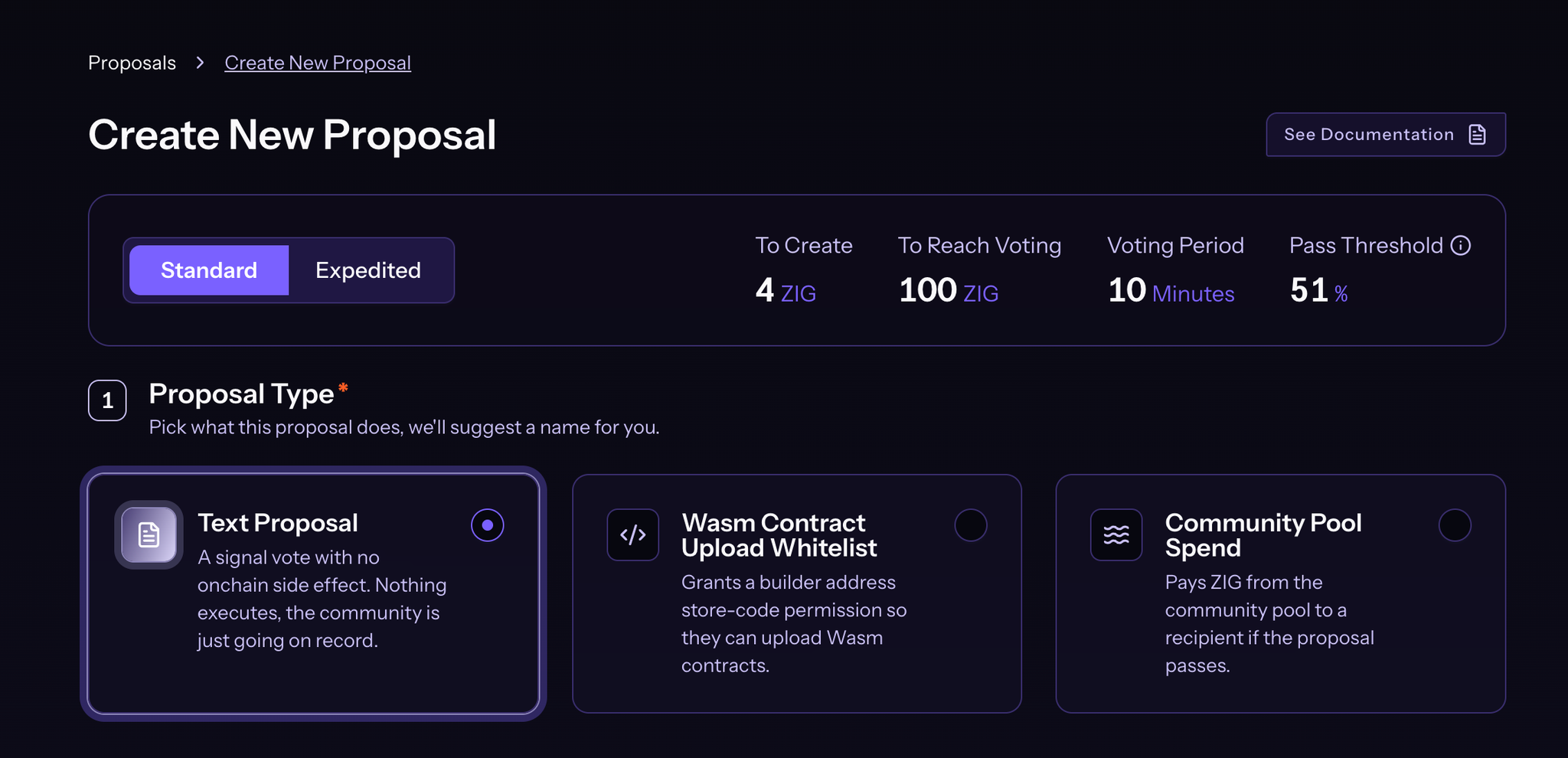
The Hub currently supports three types when you create a ZIGChain proposal: Text Proposal, Wasm Contract Upload Whitelist, and Community Pool Spend. Other message types still use the CLI submission path. After submitting, you can browse and vote from Governance Proposals on ZIGChain Hub. For deposit rules, quorum, and expedited parameters, see ZIGChain Governance.
Key Concepts
- Text Proposal: Signal vote with no on-chain run. The community goes on record; no state change executes if the vote passes on chain.
- Wasm Contract Upload Whitelist: Grants store-code permission to one or more builder addresses so those addresses can upload Wasm contracts after the vote passes.
- Community Pool Spend: Pays ZIG from the community pool to one or more recipients when the proposal passes the vote.
- Initial Deposit: The ZIG you attach when creating a proposal. It counts toward the total deposit required for the proposal to enter voting. It isn't a fee or a separate on-chain fund, and it's refundable under the normal governance rules.
- Deposit Period: Window after creation when anyone can top up ZIG until the proposal reaches the amount required to enter voting on chain.
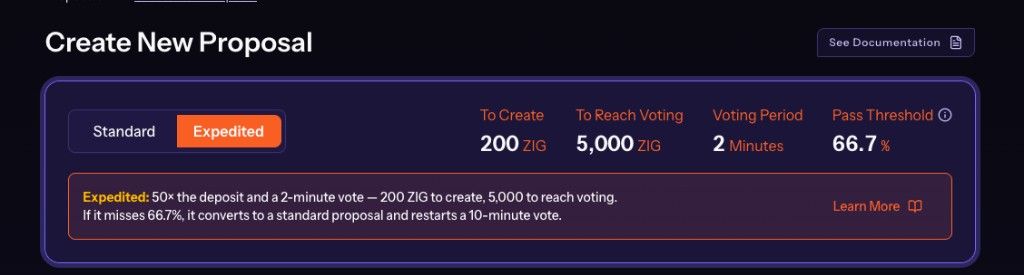
- Standard vs Expedited: A mode toggle at the top of the create form. Expedited proposals require a larger deposit and must clear a higher pass threshold, but their voting period is shorter. The Hub displays the live amounts for each mode so you can compare before choosing.
How to Create a ZIGChain Proposal
Follow these steps on the Create New Proposal page. The values shown at the top of the page (To Create, To Reach Voting, Voting Period, and Pass Threshold) reflect the network your wallet is connected to, so mainnet and testnet may differ. Use the table below to pick a type before filling out the form.
| Type | What it does | Extra fields |
|---|---|---|
| Text Proposal | Signal vote with no on-chain side effect | None |
| Wasm Contract Upload Whitelist | Grants store-code permission to builder addresses | One or more zig1... addresses |
| Community Pool Spend | Pays ZIG from the community pool if the vote passes | Recipient address(es) and amount(s) |
Open Create New Proposal
- Connect a supported wallet to ZIGChain Hub.
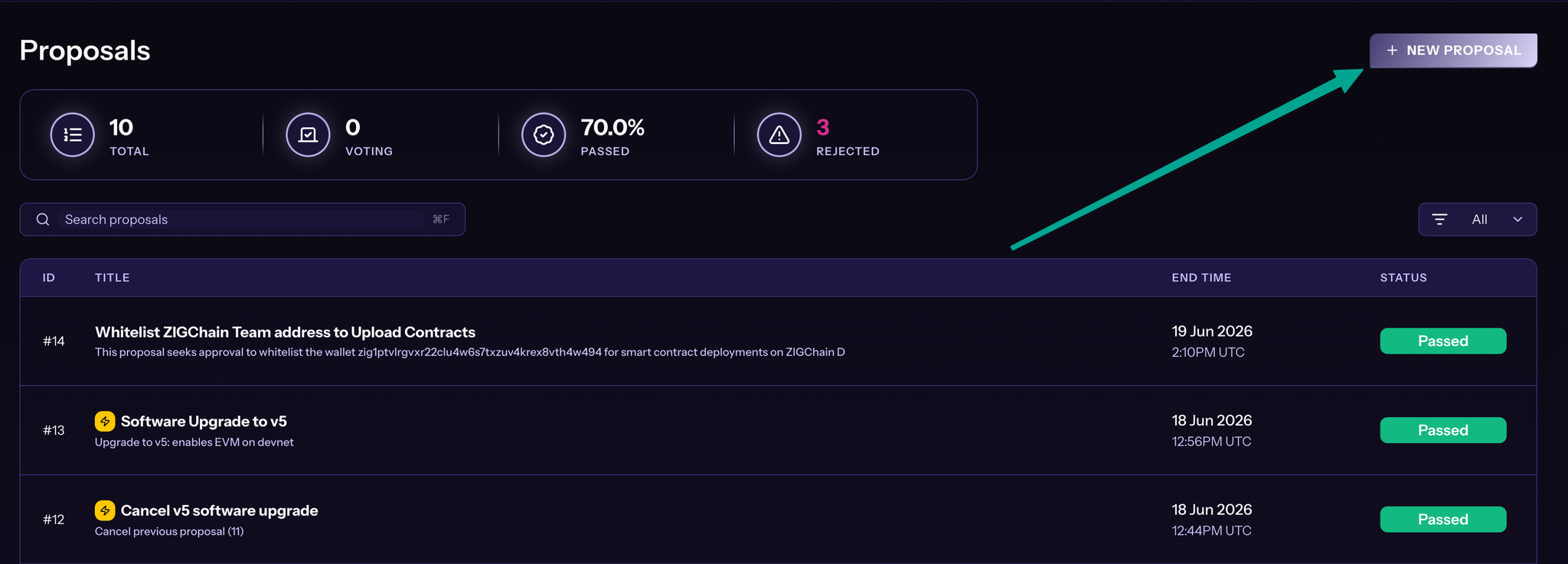
- Open the Proposals page, then click + NEW PROPOSAL in the top-right corner.
- Choose Standard or Expedited, depending on how quickly you need the vote to conclude and whether you can meet the higher deposit and pass threshold that Expedited requires. The Hub updates the values at the top when you switch modes.
Pick a Proposal Type
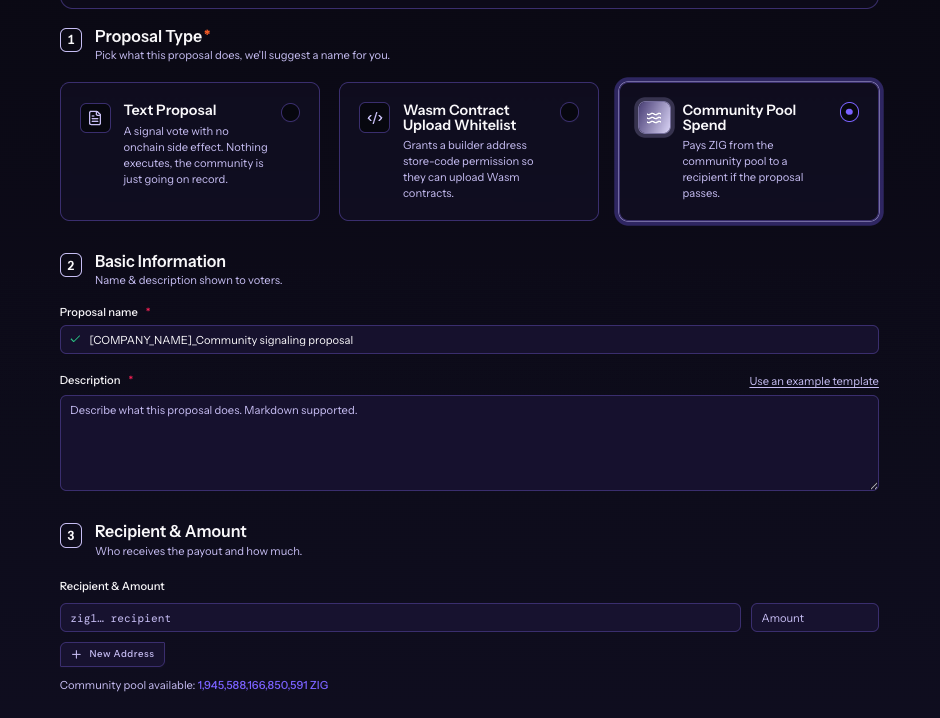
Under Proposal Type, select Text Proposal, Wasm Contract Upload Whitelist, or Community Pool Spend. The Hub suggests a name once you pick a type. Edit the name to something clear and descriptive, since this is the title voters will see.
Enter Basic Information
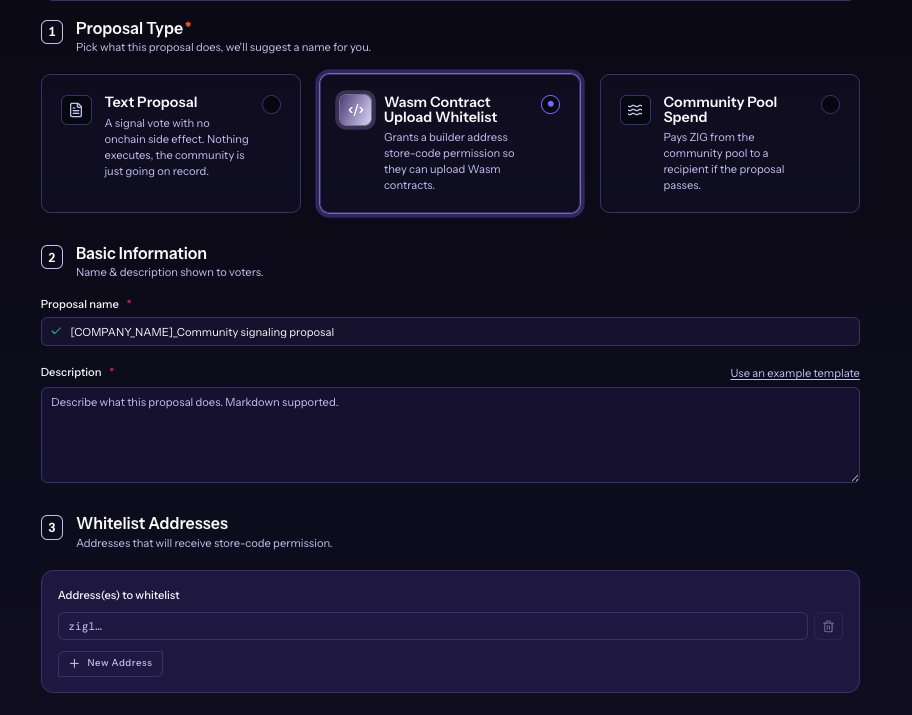
Under Basic Information, set Proposal name (required) and Description (required). Markdown is supported in the description. Use Use an example template for a starting outline.
Complete Type-Specific Fields
The next section changes with the type you selected when you create a ZIGChain proposal.
Text Proposal. The page shows No Extra Configuration. Nothing executes on chain if the vote passes. Continue to the deposit step.
Wasm Contract Upload Whitelist. Under Whitelist Addresses, enter each builder address (zig1...). Click + New Address to add more rows. Remove a row with the trash icon if needed.
Community Pool Spend. Under Recipient & Amount, enter the recipient (zig1...) and the ZIG amount. Click + New Address for more rows. Check Community pool available so the total payout fits the pool balance the Hub displays.
Review Ballot and Set Deposit
The Ballot section shows Yes, No, No with Veto, and Abstain. You do not configure these options; they are fixed when you create a ZIGChain proposal in the Hub.
Under Initial Deposit, enter the Amount to deposit now. The deposit creates the proposal; it does not fund the vote. Watch the progress bar toward the voting target. Deposits return after voting ends unless No-with-Veto reaches its threshold. Anyone can top up during the deposit period.
The Hub displays live deposit, voting period, and threshold values for the network you are on. Confirm Mainnet amounts in the values at the top of the create page (To Create, To Reach Voting, Voting Period, and Pass Threshold) before you submit.
Preview and Confirm On Chain
- Click Preview or Continue when the form is valid.
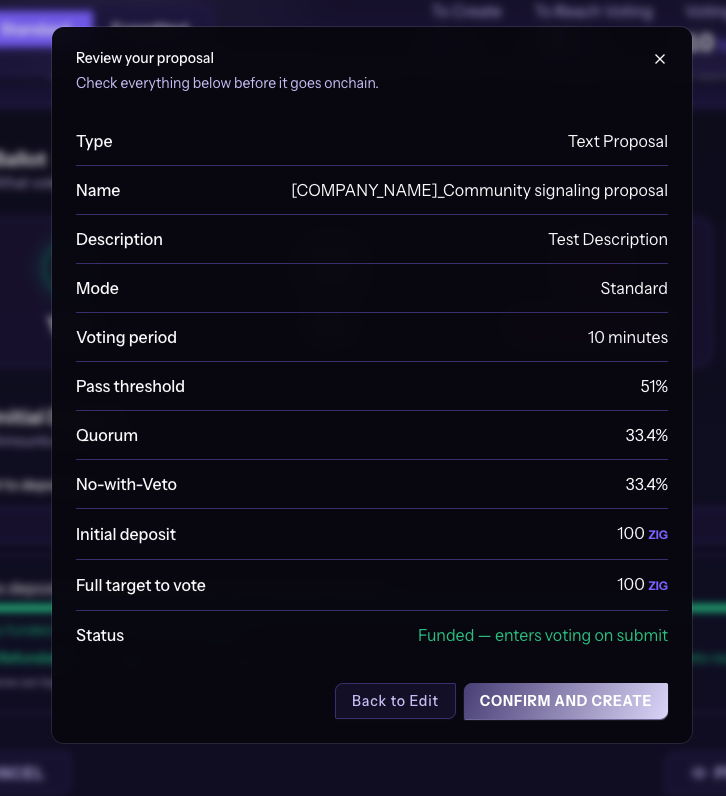
- In Review your proposal, check type, name, description, mode, thresholds, and deposit values.
- Confirm the status line. Funded proposals can enter voting on submit when the deposit meets the target.
- Click CONFIRM AND CREATE and approve the transaction in your wallet.
- Use Back to Edit to change a field before you create a ZIGChain proposal on chain.
After the transaction confirms, open the item from Proposals to track deposit or voting.
Common Questions
Do I still need the CLI to create a ZIGChain proposal?
Not for the three Hub-supported types: Text Proposal, Wasm Contract Upload Whitelist, and Community Pool Spend. Use the Governance Proposal Submission Guide for other message types that the Hub does not list yet.
What is the difference between Standard and Expedited when I create a ZIGChain proposal?
Expedited needs a larger deposit and a higher pass bar than Standard, but the vote finishes in a shorter time. Switch modes on the create page to see the live amounts for your network.
Is the deposit refundable after I create a ZIGChain proposal?
Yes for proposals that are not vetoed. The Hub states that the deposit returns after voting ends and is burned only if No-with-Veto reaches its threshold. If the deposit target is not met before the deposit period ends, the proposal fails and deposited ZIG still return to depositors.
Can other people add to the deposit after I create a ZIGChain proposal?
Yes. Anyone can top up during the deposit period until the proposal reaches the amount required to enter voting. You can also deposit the full target yourself so the proposal enters voting on submit when the Hub shows a funded status on the review screen.