Set Up a ZIGChain Validator
TL;DR: ZIGChain validator setup covers requirements, node preparation, the create-validator transaction, bonding verification, and post-creation operations including commissions, jailing, and unjail.
Overview
This guide documents ZIGChain validator setup from prerequisites through create-validator, on-chain verification, and ongoing validator operations. The procedure assumes a dedicated synced node, a ZIGChain account without an existing validator, and sufficient ZIG for self-delegation and transaction fees.
Sections follow the sequence used on Mainnet and Testnet: prepare the node, define validator metadata, broadcast the create-validator transaction, confirm bonding, and validate active-set membership. Command examples are grouped by network (Mainnet, Testnet, or Local).
Common setup failures involve an incorrect consensus public key, a reused operator account, or insufficient self-delegation. Operators should retain the transaction hash and validator operator address from the create-validator step; later queries depend on both values.
For command-only reference, see the Validator Quick Sheet. For node installation, see Set Up a ZIGChain Node.
Key Concepts
- Validator operator address:
zigvaloper1prefix; returned when the validator is created. - Consensus pubkey: Ed25519 key from
zigchaind tendermint show-validator; unique per validator. - Commission rate: Initial rate at creation; capped by max rate and daily max change (fixed after creation).
- min-self-delegation: Minimum bonded tokens the validator must keep.
- timeout_commit:
config.tomltiming all validators must match (Mainnet 2.5s, Testnet 5s). - Active set: Staked validators that sign blocks; query with
tendermint-validator-set.
Validator Requirements
Validators participate in consensus by signing blocks. Staking rewards accumulate while the node stays online, votes in step with the network, and avoids slashable faults such as double-signing or extended missed blocks. Under-provisioned hardware or a shared node increases downtime and slash risk. ZIGChain validator setup starts with hardware, a synced node, an account, and stake—confirm each item below.
Before broadcasting create-validator, confirm the node is synced and stable, the operator account does not already own a validator, and the wallet balance covers self-delegation and transaction fees.
Validator Hardware Requirements
Recommended specs for a stable validator node:
- CPU: 8 vCPUs (4 physical cores)
- Memory: 64 GB RAM
- Storage: 500 GB – 1 TB SSD
- (Exact size depends on pruning and indexing configuration)
- Network: Stable, high-bandwidth, low-latency connection
Supported Binary Architectures
The zigchaind binary is available for the following architectures:
- linux-amd64 — Linux servers (Intel/AMD) (recommended for production)
- darwin-arm64 — macOS on Apple Silicon (testing only)
- darwin-amd64 — macOS on Intel (testing only)
Other Requirements
-
A Running Node
- Ensure you have a dedicated node without any other validators operating on it.
- Follow the Set Up a ZIGChain Node guide if needed.
-
A ZIGChain Account
- The account must not already own a validator.
-
ZIG Tokens
- You will need to self-delegate tokens to your new validator.
ZIGChain Validator Setup Steps
Node preparation
Configure timeout_commit in ~/.zigchaind/config/config.toml before creating your validator. Per CometBFT documentation, all validators must use the same timeout_commit value to ensure consistent block production timing and avoid race conditions in optimistic execution.
- Mainnet
- Testnet
[consensus]
timeout_commit = "2.5s"
[consensus]
timeout_commit = "5s"
❗️ Mismatched values across validators will cause optimistic execution errors and network performance issues.
To update the config and restart the node:
sed -i 's/timeout_commit = "5s"/timeout_commit = "2.5s"/' ~/.zigchaind/config/config.toml
systemctl restart zigchaind
Step 1: Get your node validator pubkey
Run the following command to retrieve your validator's public key:
zigchaind tendermint show-validator
Example output:
{
  "@type": "/cosmos.crypto.ed25519.PubKey",
  "key": "YYOjubD+2Z5Ytu66JnN0IkJ5BAAApd07Dfj7EF+QQaA="
}
Response explanation:
@type:the public key type. It's using the Ed25519 elliptic curve cryptography algorithm.key:the validator's public key in Base64-encoded format.
Step 2: Define your validator
Create a JSON file containing your validator information, including your node validator public key.
PUBKEY=$(zigchaind tendermint show-validator)
bash -c "cat > /tmp/your_validator.txt" << EOM
{
    "pubkey": $PUBKEY,
    "amount": "1000000000000000000azig",
    "moniker": "validator's name",
    "identity": "optional identity signature (ex. UPort or Keybase)",
    "website": "validator's (optional) website",
    "security": "validator's (optional) security contact email",
    "details": "validator's (optional) details",
    "commission-rate": "0.1",
    "commission-max-rate": "0.2",
    "commission-max-change-rate": "0.01",
    "min-self-delegation": "10"
}
EOM
commission-max-rate and commission-max-change-rate can not be changed after the validator is created. Be mindful when setting these values.
Fields explanation:
pubkey:the node validator's public key (get it by runningzigchaind tendermint show-validator).amount:the amount of tokens self-delegated during validator creation (should be greater than themin-self-delegation).moniker:the validator's display name (max. length 70 characters).identity:an optional field for the validator's identity signature (e.g., UPort or Keybase). It allows you to have a logo on your validator profile. Check How to add your validator avatar to keybase.io.website:an optional field for the validator's website (max. length 140 characters).security:an optional field for the validator's security contact email (max. length 140 characters).details:an optional field for the additional details about the validator (max. length 280 characters).commission-rate:the validator's initial commission rate (any number between 0 andcommission-max-rate).commission-max-rate:the validator's maximum commission rate (any number between 0 and 1; not editable after creation).commission-max-change-rate:the maximum daily validator's commission rate increase (any number between 0 andcommission-max-rate; not editable after creation).min-self-delegation:the minimum bonded tokens at all times.
Step 3: Create your validator
Run the following command to create your validator:
- Mainnet
- Testnet
- Local
zigchaind tx staking create-validator /tmp/your_validator.txt \
--from $ACCOUNT \
--chain-id zigchain-1 \
--node https://public-zigchain-rpc.numia.xyz \
--gas "auto" \
--gas-prices "2500000000azig" \
--gas-adjustment=1.5
zigchaind tx staking create-validator /tmp/your_validator.txt \
--from $ACCOUNT \
--chain-id zig-test-2 \
--node https://public-zigchain-testnet-rpc.numia.xyz \
--gas "auto" \
--gas-prices "2500000000azig" \
--gas-adjustment=1.5
zigchaind tx staking create-validator /tmp/your_validator.txt \
--from zuser1 \
--chain-id zigchain-1 \
--node http://localhost:26657 \
--gas "auto" \
--gas-prices="2500000000azig" \
--gas-adjustment=1.5
Fields explanation:
from: validator operator managing the validator.chain-id: the specific chain identifier where the validator will be created (in this case ZIGChain).gas: automatically estimated the maximum required gas.gas-prices: your specified transaction gas price.gas-adjustment: the gas adjustment factor to apply to the gas estimation. While 1.3 is the standard value, we recommend using 1.5 for this operation based on our experience.
Learn more about fees in the fees article.
From the transaction response, you will receive two important pieces of information:
- your validator operator address
- transaction id (txhash)
Example:
"validator_address": "zigvaloper12mhql6ex6c9350m2ectj5zaexldv0v5sa8p37p",
"txhash":"ABC07E49CCE32C69FDE3DC0737142C0FD0BB8C065BA8467507A371E38383C66"
The Validator Operator Address begins with zigvaloper1 (for more details, check Validator's Accounts).
Note: If you don't have the validator_address, you can obtain it in the following step.
Troubleshooting
- Each validator operator (
--from=zuser1) can only operate one validator at a time.
Specific error during creation if reused:
validator already exist for this operator address; must use new validator operator address
- It is possible to have only one node per node validator's public key.
Specific error during creation if reused:
validator already exist for this pubkey; must use new validator pubkey
Step 4: Verify validator creation
Check if your validator was successfully created by running the following command. Replace the TXHASH with the transaction ID from the previous step.
- Mainnet
- Testnet
- Local
TXHASH=ABC07E49CCE32C69FDE3DC0737142C0FD0BB8C065BA8467507A371E38383C66
View full transaction log
zigchaind query tx $TXHASH \
--chain-id zigchain-1 --node https://public-zigchain-rpc.numia.xyz
View only error info
zigchaind query tx $TXHASH \
--chain-id zigchain-1 --node https://public-zigchain-rpc.numia.xyz | grep raw_log
TXHASH=ABC07E49CCE32C69FDE3DC0737142C0FD0BB8C065BA8467507A371E38383C66
View full transaction log
zigchaind query tx $TXHASH \
--chain-id zig-test-2 --node https://public-zigchain-testnet-rpc.numia.xyz
View only error info
zigchaind query tx $TXHASH \
--chain-id zig-test-2 --node https://public-zigchain-testnet-rpc.numia.xyz | grep raw_log
TXHASH=ABC07E49CCE32C69FDE3DC0737142C0FD0BB8C065BA8467507A371E38383C66
View full transaction log
zigchaind query tx $TXHASH \
--chain-id zigchain-1 --node http://localhost:26657
View only error info
zigchaind query tx $TXHASH \
--chain-id zigchain-1 --node http://localhost:26657 | grep raw_log
If raw_log: "" , the transaction was successful.
If there is an error, it will be shown in the raw_log field.
Retrieve your validator address:
To get the validator address from the response, you can run:
- Mainnet
- Testnet
- Local
zigchaind q tx $TXHASH \
--chain-id zigchain-1 --node https://public-zigchain-rpc.numia.xyz \
--output json | jq -r '.tx.body.messages[0].validator_address'
zigchaind q tx $TXHASH \
--chain-id zig-test-2 --node https://public-zigchain-testnet-rpc.numia.xyz \
--output json | jq -r '.tx.body.messages[0].validator_address'
zigchaind q tx $TXHASH \
--chain-id zigchain-1 --node http://localhost:26657 \
--output json | jq -r '.tx.body.messages[0].validator_address'
The response should be: zigvaloper1...
Step 5: Check if your validator is created
You can see your validator info by running the following command.
Replace the VALIDATOR_OP_ADDRESS with the validator operator address from the steps above—the validator_address in the create response (step 3) or the address you read from the transaction query after step 4. The commands below use an example address; replace it with yours.
- Mainnet
- Testnet
- Local
VALIDATOR_OP_ADDRESS=zigvaloper12345abcd
zigchaind query staking validator $VALIDATOR_OP_ADDRESS \
--chain-id zigchain-1 --node https://public-zigchain-rpc.numia.xyz
VALIDATOR_OP_ADDRESS=zigvaloper12345abcd
zigchaind query staking validator $VALIDATOR_OP_ADDRESS \
--chain-id zig-test-2 --node https://public-zigchain-testnet-rpc.numia.xyz
VALIDATOR_OP_ADDRESS=zigvaloper12345abcd
zigchaind query staking validator $VALIDATOR_OP_ADDRESS \
--chain-id zigchain-1 --node http://localhost:26657
Example of a response including all the possible fields:
validator:
  commission:
    commission_rates:
      max_change_rate: "30000000000000000"
      max_rate: "220000000000000000"
      rate: "110000000000000000"
    update_time: "2024-09-17T15:08:29.583355Z"
  consensus_pubkey:
    type: tendermint/PubKeyEd25519
    value: FlkEP2/4IJNlic07hZ8QGDGxtKs6wiTOVo7cXsXLdf4=
  delegator_shares: "100000000000000000000000000000000000000"
  description:
    details: validator's (optional) details
    identity: optional identity signature (ex. UPort or Keybase)
    moniker: validator's name
    security_contact: validator's (optional) security contact email
    website: validator's (optional) website
  jailed: true
  min_self_delegation: "1"
  operator_address: zigvaloper1khqz3l8tfaxqau6gsaxdsutyu6g0mg7d7hmel9
  status: 3
  tokens: "100000000000000000000"
  unbonding_height: "408"
  unbonding_ids:
  - "1"
  unbonding_time: "2024-09-17T15:08:29.583355Z"
Note: Take into account that most of the numbers are multiplied by 10^18.
Fields explanation:
max_change_rate:the validator's max_change_rate (provided in the create-validator transaction)max_rate:the validator's max_rate (provided in the create-validator transaction)rate: the validator's commission rate (provided in the create-validator transaction)update_time: the time since the last commission update.consensus_pubkey: the validator's public key.delegator_shares:the total amount of tokens delegated to the validator multiplied by 10^18.description:the validator's information.jailed:the validator's status (if true, the validator is jailed).min_self_delegation:the minimum bonded tokens at all timesoperator_address:the validator's operator address,generated during creation.status:the validator's status (0: Unspecified, 1: Unbonded, 2: Unbonding, 3: Bonded; for more details check Validators Statuses).tokens:the amount of tokens held by the validator.unbonding_height:the height where the unbonding happened.unbonding_ids:the id of the unbonding, which can include multiple instances and validator jailing events.unbonding_time:when the unbonding will finish.
Step 6: Check if your validator is in the active set
You can check if your validator is in the active set by running:
This command will only return an answer if your validator is in the active set. If it's not active, the command will not return any results.
- Mainnet
- Testnet
- Local
zigchaind query tendermint-validator-set \
--chain-id zigchain-1 --node https://public-zigchain-rpc.numia.xyz \
| grep "$(zigchaind tendermint show-address)"
zigchaind query tendermint-validator-set \
--chain-id zig-test-2 --node https://public-zigchain-testnet-rpc.numia.xyz \
| grep "$(zigchaind tendermint show-address)"
zigchaind query tendermint-validator-set \
--chain-id zigchain-1 --node http://localhost:26657 \
| grep "$(zigchaind tendermint show-address)"
Response output example:
block_height: "182"
pagination:
  next_key: null
  total: "2"
validators:
- address: zigvalcons1raz54tdwlsg3lfx45l57emvd0mnhshmfsspe4a
  proposer_priority: "494"
  pub_key:
    '@type': /cosmos.crypto.ed25519.PubKey
    key: FQIAIKv1pNhe5uzg8OOI4AF+cHZY/QruQha2LlBaELA=
  voting_power: "1000"
- address: zigvalcons1ws6z6vrdgjm33t9qvukqjd7cmh5kew6xsyc0qm
  proposer_priority: "-494"
  pub_key:
    '@type': /cosmos.crypto.ed25519.PubKey
    key: FQIAIKv1pNhe5uzg8OOI4AF+cHZY/QruQha2LlBaEEE=
  voting_power: "1"
Fields explanation:
block_height:the blockchain height at which the validator joined the active set.address:the validator's consensus address.proposer_priority:the validator's priority to propose a block.pub_key:the validator's public key.voting_power:the validator's voting power in the active set.
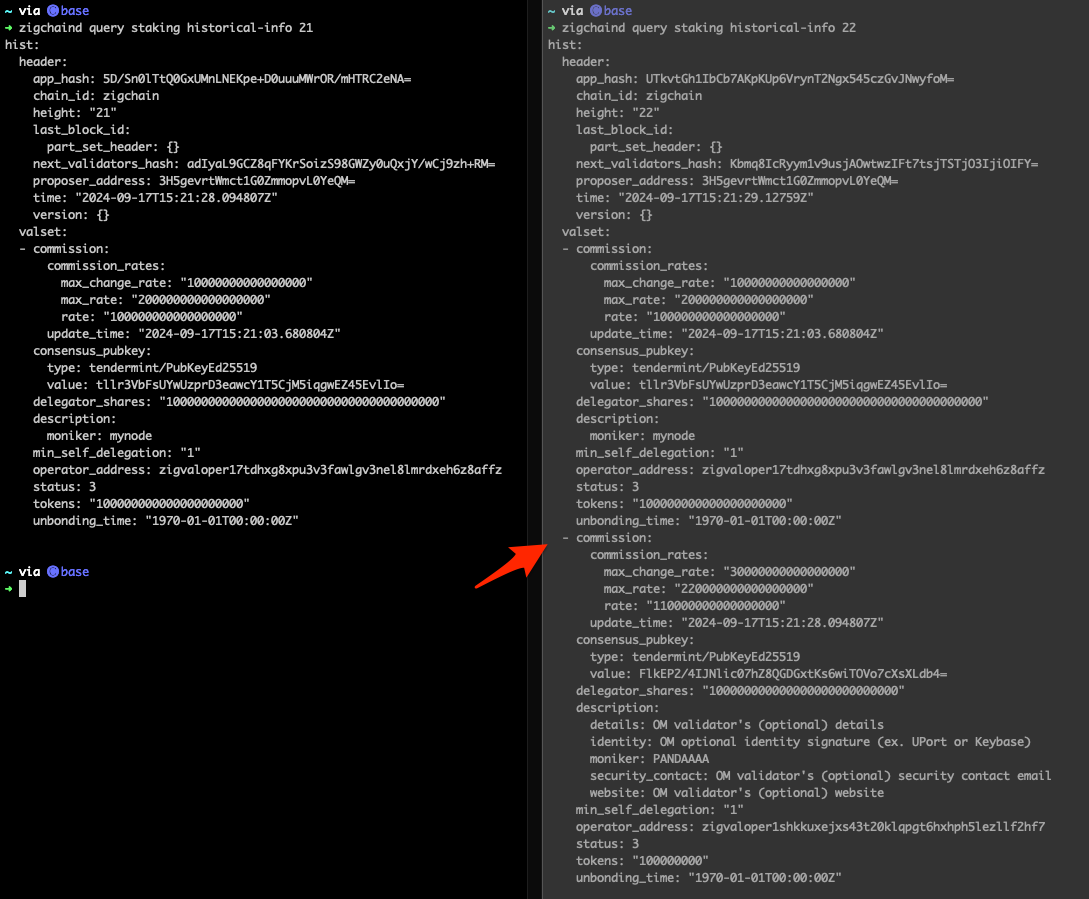
Check Validator Creation Height Block Info
The block height at which your validator was created (e.g. height 1000) can be verified. Using the staking historical-info query, you'll notice that your validator does not appear at the exact creation height but in the following block (e.g. height 1001).
- Mainnet
- Testnet
- Local
zigchaind query staking historical-info [height] \
--chain-id zigchain-1 --node https://public-zigchain-rpc.numia.xyz
zigchaind query staking historical-info [height] \
--chain-id zig-test-2 --node https://public-zigchain-testnet-rpc.numia.xyz
zigchaind query staking historical-info  [height] \
--chain-id zigchain-1 --node http://localhost:26657
Here's an example:
How to add your validator avatar to Keybase
-
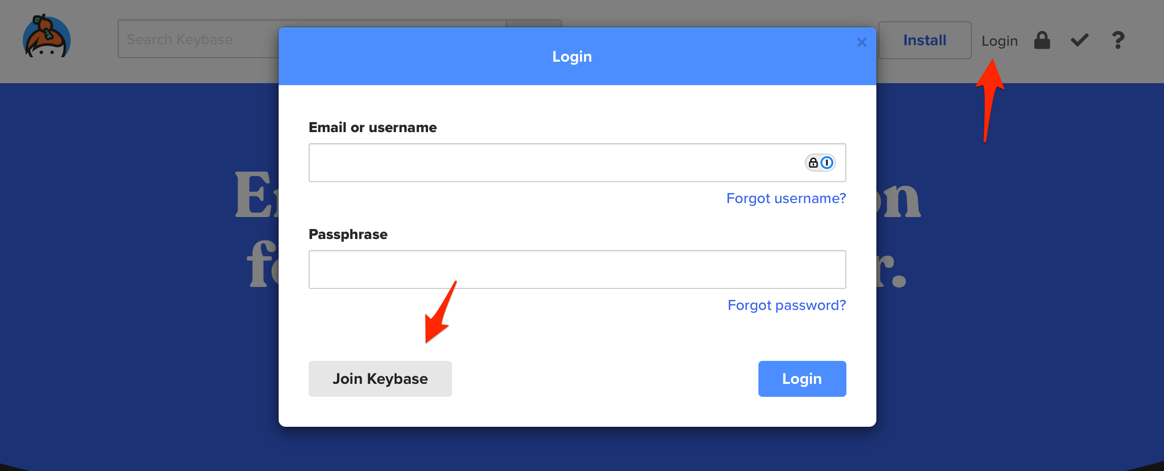
Visit keybase.io
-
Click on the Login button and then the Join Keybase button
-
Create a new account (enter your email, username, and password). The username will be used to create your profile URL.
-
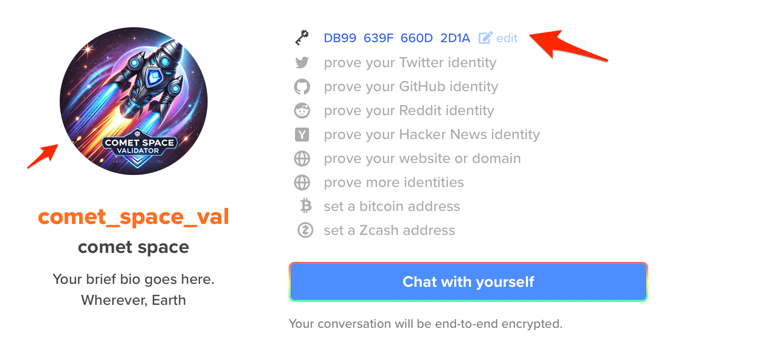
Add a logo to your profile
-
Create a PGP key or add your existing key
-
Add the key to your Validator Identity Key
Manage your Validator
As a validator, you can perform several management tasks, including:
- Updating validator information,
- Checking jail status,
- Unjailing validators,
- Withdrawing earned commissions.
Retrieve your validator addresses
If you haven't restored your account yet, you'll need to do so first. See the CLI command to recover an account guide.
Run the following command to retrieve your validator operator address (zigvaloper1...):
zigchaind keys show <key-name> --bech val --address
Run the following command to retrieve your validator consensus address (zigvalcons1...):
The query slashing signing-info command will only return a result if your validator is bonded and in the active set.
- Mainnet
- Testnet
- Local
zigchaind comet show-address
zigchaind query slashing signing-info \
$(zigchaind tendermint show-validator) \
--chain-id zigchain-1 --node https://public-zigchain-rpc.numia.xyz
zigchaind comet show-address
zigchaind query slashing signing-info \
$(zigchaind tendermint show-validator) \
--chain-id zig-test-2 --node https://public-zigchain-testnet-rpc.numia.xyz
zigchaind comet show-address
zigchaind query slashing signing-info \
$(zigchaind tendermint show-validator) \
--chain-id zigchain-1 --node http://localhost:26657
Check if your validator is in the active set
To check if your validator is in the active set, run the following command:
- Mainnet
- Testnet
- Local
zigchaind query staking validators \
--chain-id zigchain-1 --node https://public-zigchain-rpc.numia.xyz \
| grep -A 2 $(zigchaind tendermint show-validator)
zigchaind query staking validators \
--chain-id zig-test-2 --node https://public-zigchain-testnet-rpc.numia.xyz \
| grep -A 2 $(zigchaind tendermint show-validator)
zigchaind query staking validators \
--chain-id zigchain-1 --node http://localhost:26657 \
| grep -A 2 $(zigchaind tendermint show-validator)
Update your validator information
Update your validator information by running the following command:
- Mainnet
- Testnet
- Local
zigchaind tx staking edit-validator \
  --commission-rate 0.05 \
  --details "YOUR_DETAILS" \
  --identity "YOUR_KEYBASE_ID" \
  --min-self-delegation "100" \
  --new-moniker "Your new moniker name" \
  --website "YOUR_WEBSITE_URL" \
  --security-contact "YOUR_EMAIL" \
  --chain-id zigchain-1 \
  --node https://public-zigchain-rpc.numia.xyz \
  --from $ACCOUNT \
  --gas-adjustment 1.5 \
  --gas auto \
  --gas-prices="2500000000azig"
zigchaind tx staking edit-validator \
  --commission-rate 0.05 \
  --details "YOUR_DETAILS" \
  --identity "YOUR_KEYBASE_ID" \
  --min-self-delegation "100" \
  --new-moniker "Your new moniker name" \
  --website "YOUR_WEBSITE_URL" \
  --security-contact "YOUR_EMAIL" \
  --chain-id zig-test-2 \
  --node https://public-zigchain-testnet-rpc.numia.xyz \
  --from $ACCOUNT \
  --gas-adjustment 1.5 \
  --gas auto \
  --gas-prices="2500000000azig"
zigchaind tx staking edit-validator \
  --commission-rate 0.05 \
  --details "YOUR_DETAILS" \
  --identity "YOUR_KEYBASE_ID" \
  --min-self-delegation "100" \
  --new-moniker "Your new moniker name" \
  --website "YOUR_WEBSITE_URL" \
  --security-contact "YOUR_EMAIL" \
  --chain-id zigchain-1 \
  --node http://localhost:26657 \
  --from zuser1 \
  --gas-adjustment 1.5 \
  --gas auto \
  --gas-prices="2500000000azig"
Fields explanation:
commission-rate:the validator's initial commission rate (any number between 0 andcommission-max-rate).details:an optional field for the additional validator's details (max. length 280 characters).identity:an optional field for the validator's identity signature (e.g., UPort or Keybase). It allows you to have a logo on your validator profile. To do it check How to add your validator avatar to keybase.io.min-self-delegation:the minimum amount of bonded tokens required.new-moniker:the validator's display name (max. length 70 characters).website:an optional field for the validator's website (max. length 140 characters).security-contact:an optional field for the validator's security contact email (max. length 140 characters).
❗️ About commission-rate:
-
You can not change
commission-max-change-ratemore than once in 24h (including Validator's creation).If you try to, it triggers the following error:
Error Example: "rpc error: code = Unknown desc = rpc error: code = Unknown desc = failed to execute message; message index: 0: commission cannot be changed more than once in 24h [cosmos/[email protected]/baseapp/baseapp.go:1000] with gas used: '36017': unknown request"
commission-ratemust be between 0 and the validator'scommission-max-rateIt must not exceed the validator'scommission-max-change-rate,which limits the percentage point increase per day. In other words, a validator can only change its commission once per day and within commission-max-change-rate bounds.
Check rewards earned by a validator
To check validator commission rewards, run the following command:
- Mainnet
- Testnet
- Local
VALIDATOR_OP_ADDRESS=zigvaloper1kzw7uq9u9y37fgf83t26j0cy9rg8dfz2hyg2x5
zigchaind query distribution commission $VALIDATOR_OP_ADDRESS \
--chain-id zigchain-1 --node https://public-zigchain-rpc.numia.xyz
VALIDATOR_OP_ADDRESS=zigvaloper1kzw7uq9u9y37fgf83t26j0cy9rg8dfz2hyg2x5
zigchaind query distribution commission $VALIDATOR_OP_ADDRESS \
--chain-id zig-test-2 --node https://public-zigchain-testnet-rpc.numia.xyz
VALIDATOR_OP_ADDRESS=zigvaloper1kzw7uq9u9y37fgf83t26j0cy9rg8dfz2hyg2x5
zigchaind query distribution commission $VALIDATOR_OP_ADDRESS \
--chain-id zigchain-1 --node http://localhost:26657
Response example:
commission:
  commission:
  - amount: "2704918545530833605106000000000000000"
    denom: azig
To check the distribution outstanding (un-withdrawn) validator rewards, including the self-bonded rewards, run:
- Mainnet
- Testnet
- Local
VALIDATOR_OP_ADDRESS=zigvaloper1kzw7uq9u9y37fgf83t26j0cy9rg8dfz2hyg2x5
zigchaind query distribution validator-distribution-info $VALIDATOR_OP_ADDRESS \
--chain-id zigchain-1 --node https://public-zigchain-rpc.numia.xyz
VALIDATOR_OP_ADDRESS=zigvaloper1kzw7uq9u9y37fgf83t26j0cy9rg8dfz2hyg2x5
zigchaind query distribution validator-distribution-info $VALIDATOR_OP_ADDRESS \
--chain-id zig-test-2 --node https://public-zigchain-testnet-rpc.numia.xyz
VALIDATOR_OP_ADDRESS=zigvaloper1kzw7uq9u9y37fgf83t26j0cy9rg8dfz2hyg2x5
zigchaind query distribution validator-distribution-info $VALIDATOR_OP_ADDRESS \
--chain-id zigchain-1 --node http://localhost:26657
Response:
commission:
- amount: "38375879093711570202393995300207049"
  denom: azig
operator_address: zig1dpl7jfuw6t5g7hnryhkeecard2wkjpdscdpmph
self_bond_rewards:
- amount: "345382911843404131821248564921305348"
  denom: azig
Withdraw Validator Commissions
To withdraw earned commissions, run the following command:
- Mainnet
- Testnet
- Local
VALIDATOR_OP_ADDRESS=zigvaloper1kzw7uq9u9y37fgf83t26j0cy9rg8dfz2hyg2x5
zigchaind tx distribution withdraw-rewards $VALIDATOR_OP_ADDRESS \
  --chain-id zigchain-1 \
  --node https://public-zigchain-rpc.numia.xyz \
  --from $ACCOUNT \
  --gas-adjustment 1.5 \
  --gas auto \
  --gas-prices="2500000000azig"
VALIDATOR_OP_ADDRESS=zigvaloper1kzw7uq9u9y37fgf83t26j0cy9rg8dfz2hyg2x5
zigchaind tx distribution withdraw-rewards $VALIDATOR_OP_ADDRESS \
  --chain-id zig-test-2 \
  --node https://public-zigchain-testnet-rpc.numia.xyz \
  --from $ACCOUNT \
  --gas-adjustment 1.5 \
  --gas auto \
  --gas-prices="2500000000azig"
VALIDATOR_OP_ADDRESS=zigvaloper1kzw7uq9u9y37fgf83t26j0cy9rg8dfz2hyg2x5
zigchaind tx distribution withdraw-rewards $VALIDATOR_OP_ADDRESS \
  --chain-id zigchain-1 \
  --node http://localhost:26657 \
  --from zuser1 \
  --gas-adjustment 1.5 \
  --gas auto \
  --gas-prices="2500000000azig"
Validator Slashing Information
There are two types of slashing:
- Down-time slashing: If a validator misses blocks, it gets slashed.
- Double-sign slashing: If a validator signs two blocks at the same height, it gets slashed.
When a validator is slashed two things happen:
- A portion of its stake is burned permanently.
- The validator is jailed and can not participate in the consensus process until the jail period ends.
Slashing formula:
The amount of slashing is calculated with the following formula:
Amount of slashing = slashFactor * power at time of infraction
Check If a Validator Is Jailed
To know how a validator is doing in terms of signing blocks, you can check the signing info. If the validator is not signing blocks, they will be jailed. You can check the signing info by running:
- Mainnet
- Testnet
- Local
zigchaind query slashing signing-info $(zigchaind tendermint show-address) \
--chain-id zigchain-1 --node https://public-zigchain-rpc.numia.xyz
zigchaind query slashing signing-info $(zigchaind tendermint show-address) \
--chain-id zig-test-2 --node https://public-zigchain-testnet-rpc.numia.xyz
zigchaind query slashing signing-info $(zigchaind tendermint show-address) \
--chain-id zigchain-1 --node http://localhost:26657
Response example:
info:
- address: zigvalcons1w668krhqvz0ny0y752hcu7me35gnuj22hns33n
index_offset: "28"
jailed_until: "2024-09-17T15:33:12.248209Z"
missed_blocks_counter: "28"
start_height: "3141"

- address: zigvalcons1m3lxq7h6a4dxwtw5d5ve563fhj73s7grljyqf4
index_offset: "3170"
jailed_until: "1970-01-01T00:00:00Z"
pagination:
total: "2"
Parameters explanation:
address:the validator's consensus address.index_offset:the index which is incremented each time that the validator has been bonded.jailed_until:the timestamp when the validator can be unjailed.missed_blocks_counter:a counter kept to avoid unnecessary array reads.start_height:the height at which the validator was first a candidate OR was unjailed.tombstoned:whether a validator has been tombstoned (permanently removed from the set). Only appears if true.pagination.total:is the total number of validators.
Get Slashes Amount Information
To get the slashes information of a validator, run the following command:
- Mainnet
- Testnet
- Local
VALIDATOR_OP_ADDRESS=zigvaloper1w4n0c8tttcvxp7drcw5la7nxh0ezmnyj6ttvgl
zigchaind query distribution slashes $VALIDATOR_OP_ADDRESS 0 2000 \
--chain-id zigchain-1 --node https://public-zigchain-rpc.numia.xyz
VALIDATOR_OP_ADDRESS=zigvaloper1w4n0c8tttcvxp7drcw5la7nxh0ezmnyj6ttvgl
zigchaind query distribution slashes $VALIDATOR_OP_ADDRESS 0 2000 \
--chain-id zig-test-2 --node https://public-zigchain-testnet-rpc.numia.xyz
VALIDATOR_OP_ADDRESS=zigvaloper1w4n0c8tttcvxp7drcw5la7nxh0ezmnyj6ttvgl
zigchaind query distribution slashes $VALIDATOR_OP_ADDRESS 0 2000 \
--chain-id zigchain-1 --node http://localhost:26657
Where 0 and 2000 are the starting and ending height of the query. You can change them to get the information you need.
If your validator has never been slashed you will get a null response. Otherwise, you will get the list of slashes:
pagination:
  total: "1"
slashes:
- fraction: "10000000000000000"
  validator_period: "2"
- fraction: "9090909090909091"
  validator_period: "3"
Parameters explanation:
fraction:the percentage of the validator's stake that was slashed multiplied by 10^18validator_period:the period in which the slashing occurred. It can be incremented due to slashing events or rewards payouts.
Unjail your Validator
If your validator gets slashed, it will show jailed: true in the validator information. Check if your validator is jailed by running:
- Mainnet
- Testnet
- Local
VALIDATOR_OP_ADDRESS=zigvaloper1kzw7uq9u9y37fgf83t26j0cy9rg8dfz2hyg2x5
zigchaind query staking validator $VALIDATOR_OP_ADDRESS \
--chain-id zigchain-1 --node https://public-zigchain-rpc.numia.xyz
VALIDATOR_OP_ADDRESS=zigvaloper1kzw7uq9u9y37fgf83t26j0cy9rg8dfz2hyg2x5
zigchaind query staking validator $VALIDATOR_OP_ADDRESS \
--chain-id zig-test-2 --node https://public-zigchain-testnet-rpc.numia.xyz
VALIDATOR_OP_ADDRESS=zigvaloper1kzw7uq9u9y37fgf83t26j0cy9rg8dfz2hyg2x5
zigchaind query staking validator $VALIDATOR_OP_ADDRESS \
--chain-id zigchain-1 --node http://localhost:26657
To unjail your validator, you need to wait for the jail period to end. To know when your jailing period ends, run:
- Mainnet
- Testnet
- Local
VALIDATOR_CON_ADDRESS=zigvalcons1hxdqftn7kw8d0xe7sq2xysr6mk6qfjl72x729f
zigchaind query slashing signing-info $VALIDATOR_CON_ADDRESS \
--chain-id=zigchain-1 --node https://public-zigchain-rpc.numia.xyz
zigchaind query slashing signing-info $(zigchaind tendermint show-validator) \
--chain-id=zigchain-1 --node https://public-zigchain-rpc.numia.xyz
VALIDATOR_CON_ADDRESS=zigvalcons1hxdqftn7kw8d0xe7sq2xysr6mk6qfjl72x729f
zigchaind query slashing signing-info $VALIDATOR_CON_ADDRESS \
--chain-id=zig-test-2 --node https://public-zigchain-testnet-rpc.numia.xyz
zigchaind query slashing signing-info $(zigchaind tendermint show-validator) \
--chain-id=zig-test-2 --node https://public-zigchain-testnet-rpc.numia.xyz
VALIDATOR_CON_ADDRESS=zigvalcons1hxdqftn7kw8d0xe7sq2xysr6mk6qfjl72x729f
zigchaind query slashing signing-info $VALIDATOR_CON_ADDRESS \
--chain-id=zigchain-1 --node http://localhost:26657
zigchaind query slashing signing-info $(zigchaind tendermint show-validator) \
--chain-id=zigchain-1 --node http://localhost:26657
Once the jail period ends, you can unjail your validator by running:
- Mainnet
- Testnet
- Local
zigchaind tx slashing unjail \
--chain-id zigchain-1 \
--node https://public-zigchain-rpc.numia.xyz \
--gas "auto" \
--gas-prices "2500000000azig" \
--from $ACCOUNT \
--gas-adjustment 1.5
zigchaind tx slashing unjail \
--chain-id zig-test-2 \
--node https://public-zigchain-testnet-rpc.numia.xyz \
--gas "auto" \
--gas-prices "2500000000azig" \
--from $ACCOUNT \
--gas-adjustment 1.5
zigchaind tx slashing unjail \
--chain-id zigchain-1 \
--node http://localhost:26657 \
--gas "auto" \
--gas-prices "2500000000azig" \
--from zuser1 \
--gas-adjustment 1.5
❗ After unjail, if your validator has enough stake to rank within the top validators, it will automatically be re-bonded. All delegators who were previously bonded to this validator will resume earning rewards.
If you try to unjail before the jail period ends, you will get the following error:
validator still jailed; cannot be unjailed
Check when your jail period ends by running:
- Mainnet
- Testnet
- Local
VALIDATOR_CON_ADDRESS=zigvalcons1hxdqftn7kw8d0xe7sq2xysr6mk6qfjl72x729f
zigchaind query slashing signing-info $VALIDATOR_CON_ADDRESS \
--chain-id zigchain-1 --node https://public-zigchain-rpc.numia.xyz
zigchaind query slashing signing-info $(zigchaind tendermint show-validator) \
--chain-id zigchain-1 --node https://public-zigchain-rpc.numia.xyz
VALIDATOR_CON_ADDRESS=zigvalcons1hxdqftn7kw8d0xe7sq2xysr6mk6qfjl72x729f
zigchaind query slashing signing-info $VALIDATOR_CON_ADDRESS \
--chain-id zig-test-2 --node https://public-zigchain-testnet-rpc.numia.xyz
zigchaind query slashing signing-info $(zigchaind tendermint show-validator) \
--chain-id zig-test-2 --node https://public-zigchain-testnet-rpc.numia.xyz
VALIDATOR_CON_ADDRESS=zigvalcons1hxdqftn7kw8d0xe7sq2xysr6mk6qfjl72x729f
zigchaind query slashing signing-info $VALIDATOR_CON_ADDRESS \
--chain-id zigchain-1 --node http://localhost:26657
zigchaind query slashing signing-info $(zigchaind tendermint show-validator) \
--chain-id zigchain-1 --node http://localhost:26657
Common Questions
These questions cover edge cases after the main ZIGChain validator setup steps. Use them when your ZIGChain validator setup run fails at create, verification, or active-set checks.
Can one operator account run more than one validator
No. Each validator operator (--from) can run only one validator at a time. The chain returns an error if you reuse the same operator address:
validator already exist for this operator address; must use new validator operator address
Create a new operator key and account if you need a second validator.
Can I reuse the same consensus pubkey for a new validator
No. Each node validator public key maps to one validator record. Reusing the pubkey returns:
validator already exist for this pubkey; must use new validator pubkey
Generate keys on a fresh node or rotate the consensus key first.
Why does my validator not appear at the exact creation block height
The validator appears in the block after creation (for example height 1001 instead of 1000). That delay is normal for staking state updates. Use zigchaind query staking historical-info [height] to inspect historical validator sets.
Can I change commission parameters after creating my validator
You cannot change commission-max-rate or commission-max-change-rate after creation. The live commission-rate can move at most once per 24 hours and must stay within commission-max-change-rate and commission-max-rate bounds.
Related Topics
Use these guides with your ZIGChain validator setup runbook. They support a full ZIGChain validator setup workflow from node prep to operations.
References
Cosmos SDK specs below explain staking, slashing, and distribution fields in CLI output. Use them when you decode validator status or slash queries.